
iOS 开发实用技术导航 NSHipster 中文版 http://nshipster.cn/ cocos2d 开源 2D 游戏引擎 http://www.cocos2d-iphone.org/ CocoaPods http://cocoapods.org/ Google Analytics for Mobile 统计解决方案 http://code.google.com/mobile/analytics/ WWDC https://developer.apple.com/wwdc/ Design Guides and Resources https://developer.apple.com/design/ Transcripts of WWDC sessions http://asciiwwdc.com Cocoa with Love http://cocoawithlove.com/ Cocoa Dev Central http://cocoadevcentral.com/ NSHipster http://nshipster.com/ Style Guides Google Objective-C Style Guide NYTimes Objective-C Style Guide Useful Tools and Services Charles Web Debugging Proxy Smore

这是一个创建于 1263 天前的主题,其中的信息可能已经有所发展或是发生改变。
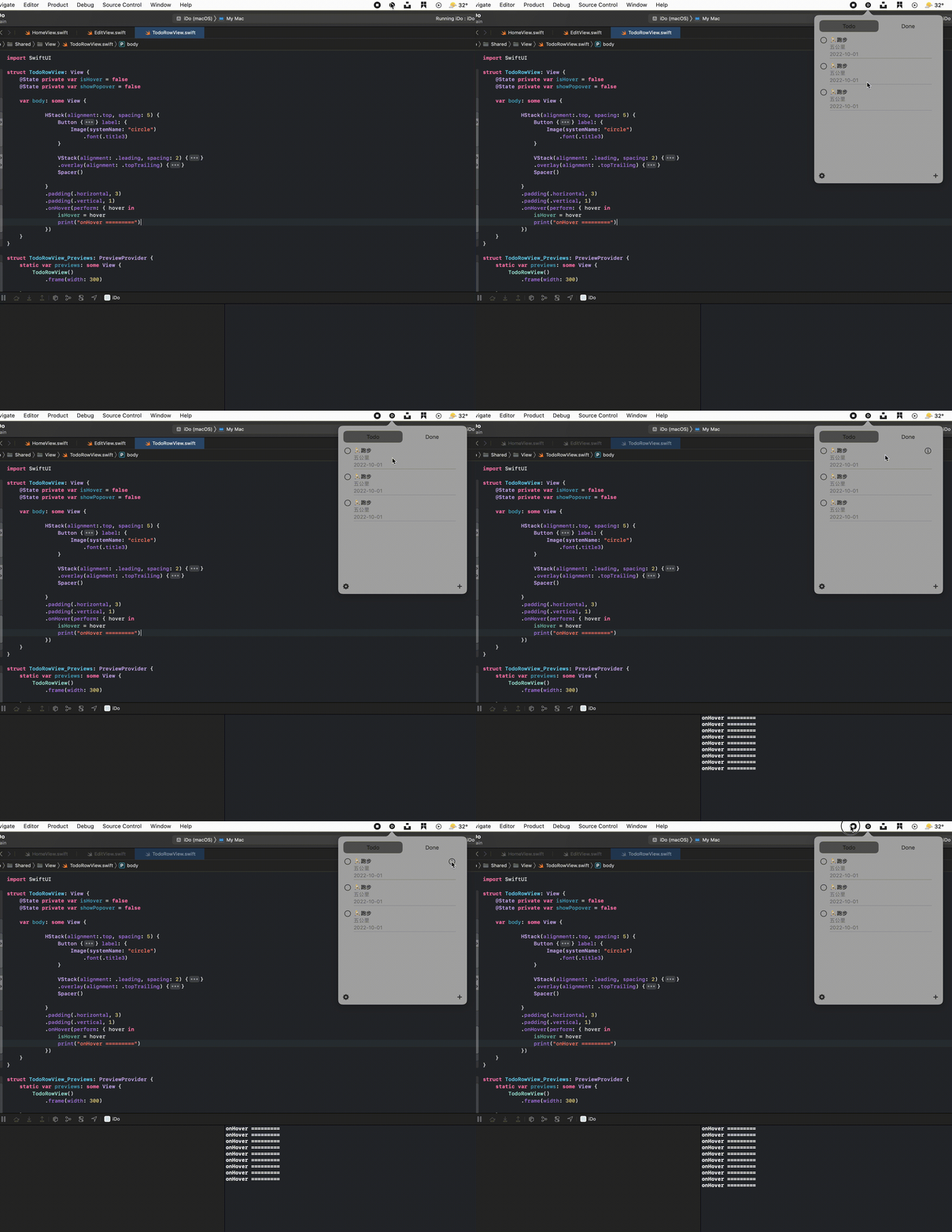
刚学习 swift 和 swiftUI 不久,目前在试着用 swiftUI 做一个纯菜单栏的 todolist 工具。现在调界面的时候碰到个问题:点击图标弹出应用后,子视图上 TodoRowView 的 onHover 事件无法触发,必须要点击一下弹出的这块区域才可以,请教下这个问题的解决办法,不胜感激
主视图结构大概是
struct HomeView: View { var body: some View { VStack { CustomSegmentedControl() ScrollView { TodoRowView() TodoRowView() TodoRowView() } HStack { xxxx.. } } } } 问题如下:
第 1 条附言 2022-07-10 14:28:47 +08:00
找到一个解决办法,菜单栏popover的代码我是看Kavsoft的视频抄的的,这块是AppKit的代码写的,并没有完全理解。只需要调整下popover.contentViewController?.view.window?.makeKey()这行代码的位置即可,把这行代码从setUpMacMenu中,挪到menuButtonAction的else中,这样还可以解决另一个问题:点击弹出区域外的位置,菜单弹出区域不会自动关闭。
代码:
class AppDelegate: NSObject, ObservableObject, NSApplicationDelegate { private var statusItem: NSStatusItem? private var popover = NSPopover() func applicationDidFinishLaunching(_ notification: Notification) { setUpMacMenu() } func setUpMacMenu() { popover.animates = true popover.behavior = .transient popover.cOntentViewController= NSViewController() popover.contentViewController?.view = NSHostingView(rootView: HomeView()) //popover.contentViewController?.view.window?.makeKey() statusItem = NSStatusBar.system.statusItem(withLength: NSStatusItem.variableLength) if let menuButton = statusItem?.button { menuButton.image = .init(systemSymbolName: "d.circle.fill", accessibilityDescription: nil) menuButton.action = #selector(menuButtonAction) } } @objc func menuButtonAction() { if popover.isShown { popover.performClose(nil) }else { if let menuButton = statusItem?.button { popover.show(relativeTo: menuButton.bounds, of: menuButton, preferredEdge: .minY) popover.contentViewController?.view.window?.makeKey() } } } }  | 1 lizhiqing 2022-07-10 11:04:54 +08:00 撞头像了 |
 | 3 andyJado 2022-07-10 12:44:13 +08:00  1 1 1. 把 ScrollVIew 宕掉 //, 然后看看好不好使. 2.建议亲把 onHover 逻辑剥离出来放到 HomeView 里. |
 | 4 shoujiaxin 2022-07-10 13:51:24 +08:00 1 popover 弹出的时候调用一下 NSApp.activate(ignoringOtherApps: true) |
 | 5 storyxc OP @andyJado #3 感谢回复,我试过这么做但是没有效果 @shoujiaxin #4 感谢大佬!把这个加进去确实能解决正文中的问题。但是后来又发现个点击 popover 以外的区域时 popover 不会自动关闭的问题,我找到 youtube 上说调整 popover.contentViewController?.view.window?.makeKey()这行代码位置的回复,尝试之后这两个问题都解决了。 无论如何还是非常感谢! |
 | 6 justin2018 2022-07-10 17:57:21 +08:00 2 |
 Select Language