
- 提示输入需要运行程序的数量。
- 直接在脚本里手工设置程序位置以便固定后长期使用。
- 脚本自动获取屏幕分辨率。
- 例如 6 个窗口打开后,脚本自动计算窗口大小和位置,把窗口放置好,窗口大小相等,2 行 n 列布局。
- 以记事本为例,能确实运行符合效果。
Set-PSReadLineKeyHandler -Chord Tab -ViMode Command -ScriptBlock { $cOntent= "" $index = 0 [Microsoft.PowerShell.PSConsoleReadLine]::ViTabCompleteNext() [Microsoft.PowerShell.PSConsoleReadLine]::GetBufferState([ref] $content, [ref] $index) [Microsoft.PowerShell.PSConsoleReadLine]::RevertLine() [Microsoft.PowerShell.PSConsoleReadLine]::Insert($content.Replace('\','/')) [Microsoft.PowerShell.PSConsoleReadLine]::SetCursorPosition($index) } 链接是这个: https://github.com/PowerShell/PSReadLine/issues/3205
cd 还有执行程序和.ps1 脚本都没啥问题,不过我也才用,可能会影响一些用到 cmd 工具的命令?
]]>想在 powershell 开始前使用命令删除这些 tmp 文件,结果执行命令时一边删除一边又生成了同样多的 tmp 文件
gci $env:TEMP\PS*.tmp -File | % { ri $_.FullName -Force } 那么现在问题来了,如何阻止 powershell 生成这些文件呢
]]>我有个长命令 pnpm store prune, 我希望能用pmsp 来替代这个命令 我不知道该如何设置 我尝试过
Set-Alias -Name pmsp -Value "pnpm store prune" Set-Alias pmsp "pnpm store prune" Set-Alias pmsp pnpm store prune 以上都不行,要么直接打开终端就报错, 要么执行 pmsp 的时候提示无法将“pnpm store prune”项识别为 cmdlet 、函数、脚本文件或可运行程序的名称
求大佬指教一下
]]>请问 v 友,有方法确认终端输出是 stdout 还是 stderr 吗?或确定终端输出的 stream 号?
]]>bash < test-fifo
用 ps -ef | grep bash 就无法找到 bash < test-fifo 这条完整命令。
请问这是 bug 吗?还是我的姿势不对? ]]>
echo %classpath% 无法得到值
在 cmd.exe 里面能得到刚设置的值 ]]>
 若关闭网络,则需要 11 秒还多:
试过将 oh-my-posh 加入 windows defender 等方法,似乎没有用
附上网络正常/断开时的 Debug 信息:
网络正常时:
Cache path: C:\Users\login\AppData\Local\oh-my-posh Config path: C:\Users\login\AppData\Local\Programs\oh-my-posh\themes\cert.omp.json Logs: [DEBUG] 13:06:43.411 shell.go:Getenv:397 → NO DATA [TRACE] 13:06:43.411 shell.go:Getenv(TERM_PROGRAM) - 0s [DEBUG] 13:06:43.411 shell.go:Getenv:397 → C:\Users\login\AppData\Local [TRACE] 13:06:43.411 shell.go:Getenv(LOCALAPPDATA) - 0s [TRACE] 13:06:43.411 shell_windows.go:CachePath() - 0s [DEBUG] 13:06:43.412 shell.go:Getenv:397 → C:\Users\login\AppData\Local\Programs\oh-my-posh\themes\cert.omp.json [TRACE] 13:06:43.412 shell.go:Getenv(POSH_THEME) - 0s [DEBUG] 13:06:43.440 shell.go:Shell:644 → process name: pwsh.exe [TRACE] 13:06:43.440 shell.go:Shell() - 28.6409ms [TRACE] 13:06:43.440 shell.go:resolveConfigPath() - 28.6409ms [TRACE] 13:06:43.440 shell.go:Init() - 29.7168ms [TRACE] 13:06:43.440 shell.go:Flags() - 0s [TRACE] 13:06:43.441 config.go:loadConfig() - 523.2µs [TRACE] 13:06:43.441 shell.go:Flags() - 0s [DEBUG] 13:06:43.441 shell.go:Getenv:397 → NO DATA [TRACE] 13:06:43.441 shell.go:Getenv(OMP_CACHE_DISABLED) - 0s [TRACE] 13:06:43.441 shell_windows.go:WindowsRegistryKeyValue(HKEY_CURRENT_USER\Software\Microsoft\Windows\DWM\ColorizationColor) - 0s [TRACE] 13:06:43.441 shell.go:GOOS() - 0s [TRACE] 13:06:43.441 shell.go:GOOS() - 0s [TRACE] 13:06:43.441 shell.go:GOOS() - 0s [TRACE] 13:06:43.441 shell.go:GOOS() - 0s [TRACE] 13:06:43.441 shell.go:GOOS() - 0s [TRACE] 13:06:43.441 shell.go:GOOS() - 0s [TRACE] 13:06:43.441 shell.go:GOOS() - 0s [TRACE] 13:06:43.441 shell.go:GOOS() - 0s [TRACE] 13:06:43.441 shell.go:GOOS() - 0s [TRACE] 13:06:43.441 shell.go:GOOS() - 0s [TRACE] 13:06:43.441 shell.go:GOOS() - 0s [TRACE] 13:06:43.441 shell.go:GOOS() - 0s [TRACE] 13:06:43.441 shell.go:GOOS() - 0s [TRACE] 13:06:43.441 shell.go:GOOS() - 0s [TRACE] 13:06:43.441 shell.go:GOOS() - 0s [TRACE] 13:06:43.441 shell.go:GOOS() - 0s [TRACE] 13:06:43.441 shell.go:GOOS() - 0s [TRACE] 13:06:43.441 shell.go:GOOS() - 0s [TRACE] 13:06:43.441 shell.go:GOOS() - 0s [DEBUG] 13:06:43.441 shell_windows.go:WindowsRegistryKeyValue:206 → ColorizationColor(DWORD): 0xC40078D4 [TRACE] 13:06:43.441 shell.go:Shell() - 0s [DEBUG] 13:06:43.441 shell.go:Getenv:397 → 7.3.6 [TRACE] 13:06:43.441 shell.go:Getenv(POSH_SHELL_VERSION) - 0s [DEBUG] 13:06:43.441 debug.go:PrintDebug:23 → Segment: Title [TRACE] 13:06:43.441 shell.go:Flags() - 0s [DEBUG] 13:06:43.441 block.go:Debug:280 → Segment: session [TRACE] 13:06:43.441 shell.go:GOOS() - 0s [DEBUG] 13:06:43.441 shell.go:Pwd:427 → C:\Users\login [TRACE] 13:06:43.441 shell.go:Pwd() - 0s [DEBUG] 13:06:43.441 shell_windows.go:56 → C:\Users\login [TRACE] 13:06:43.441 shell.go:GOOS() - 0s [DEBUG] 13:06:43.441 shell.go:Getenv:397 → NO DATA [TRACE] 13:06:43.441 shell.go:Getenv(SSH_CONNECTION) - 0s [DEBUG] 13:06:43.441 shell.go:Getenv:397 → NO DATA [TRACE] 13:06:43.441 shell.go:Getenv(SSH_CLIENT) - 0s [TRACE] 13:06:43.441 shell_windows.go:Root() - 0s [TRACE] 13:06:43.441 shell.go:Shell() - 0s [TRACE] 13:06:43.441 shell.go:ErrorCode() - 0s [TRACE] 13:06:43.441 shell_windows.go:IsWsl() - 0s [TRACE] 13:06:43.442 shell.go:Pwd() - 0s [DEBUG] 13:06:43.442 shell_windows.go:56 → C:\Users\login [TRACE] 13:06:43.442 shell.go:GOOS() - 0s [TRACE] 13:06:43.442 shell.go:GOOS() - 0s [TRACE] 13:06:43.442 shell.go:GOOS() - 0s [TRACE] 13:06:43.442 shell.go:GOOS() - 0s [TRACE] 13:06:43.442 shell.go:GOOS() - 0s [TRACE] 13:06:43.442 shell.go:GOOS() - 0s [TRACE] 13:06:43.442 shell.go:GOOS() - 0s [TRACE] 13:06:43.442 shell.go:GOOS() - 0s [DEBUG] 13:06:43.442 shell.go:User:548 → login [TRACE] 13:06:43.442 shell.go:User() - 0s [DEBUG] 13:06:43.442 shell.go:Host:560 → Avalon [TRACE] 13:06:43.442 shell.go:Host() - 0s [TRACE] 13:06:43.442 shell.go:GOOS() - 0s [DEBUG] 13:06:43.442 shell.go:Getenv:397 → NO DATA [TRACE] 13:06:43.442 shell.go:Getenv(SHLVL) - 0s [TRACE] 13:06:43.442 shell.go:TemplateCache() - 1.0664ms [TRACE] 13:06:43.442 shell.go:TemplateCache() - 0s [TRACE] 13:06:43.442 shell.go:Shell() - 0s [DEBUG] 13:06:43.442 block.go:Debug:280 → Segment: path [TRACE] 13:06:43.442 shell.go:Pwd() - 0s [DEBUG] 13:06:43.442 shell_windows.go:56 → C:\Users\login [TRACE] 13:06:43.442 shell.go:GOOS() - 0s [TRACE] 13:06:43.442 shell.go:Pwd() - 0s [TRACE] 13:06:43.442 shell.go:Shell() - 0s [TRACE] 13:06:43.442 shell.go:Flags() - 0s [DEBUG] 13:06:43.442 properties.go:GetBool:22 → mapped_locations_enabled: true [DEBUG] 13:06:43.442 properties.go:GetString:28 → [DEBUG] 13:06:43.442 properties.go:GetString:28 → [DEBUG] 13:06:43.442 shell_windows.go:56 → C:\Users\login [TRACE] 13:06:43.442 shell.go:GOOS() - 0s [TRACE] 13:06:43.442 shell.go:GOOS() - 0s [DEBUG] 13:06:43.442 properties.go:GetString:28 → ~ [DEBUG] 13:06:43.442 properties.go:GetKeyValueMap:46 → mapped_locations: map[] [TRACE] 13:06:43.442 shell.go:PathSeparator() - 0s [TRACE] 13:06:43.442 shell.go:GOOS() - 0s [TRACE] 13:06:43.442 shell.go:GOOS() - 0s [TRACE] 13:06:43.442 shell.go:GOOS() - 0s [TRACE] 13:06:43.442 shell.go:GOOS() - 0s [TRACE] 13:06:43.442 shell.go:GOOS() - 0s [TRACE] 13:06:43.442 shell.go:GOOS() - 0s [TRACE] 13:06:43.442 shell.go:GOOS() - 0s [TRACE] 13:06:43.442 shell.go:PathSeparator() - 0s [TRACE] 13:06:43.442 shell.go:PathSeparator() - 0s [TRACE] 13:06:43.442 shell.go:GOOS() - 0s [TRACE] 13:06:43.442 shell.go:GOOS() - 0s [TRACE] 13:06:43.442 shell.go:GOOS() - 0s [TRACE] 13:06:43.442 shell.go:PathSeparator() - 0s [TRACE] 13:06:43.442 shell.go:GOOS() - 0s [TRACE] 13:06:43.442 shell.go:GOOS() - 0s [TRACE] 13:06:43.442 shell.go:GOOS() - 0s [TRACE] 13:06:43.442 shell.go:PathSeparator() - 0s [TRACE] 13:06:43.442 shell.go:GOOS() - 0s [TRACE] 13:06:43.442 shell.go:GOOS() - 0s [TRACE] 13:06:43.442 shell.go:GOOS() - 0s [TRACE] 13:06:43.442 shell.go:PathSeparator() - 0s [TRACE] 13:06:43.442 shell.go:Pwd() - 0s [TRACE] 13:06:43.442 shell_windows.go:IsWsl() - 0s [TRACE] 13:06:43.442 shell.go:StackCount() - 0s [DEBUG] 13:06:43.443 win32_windows.go:isWriteable:299 → not current user or in group [DEBUG] 13:06:43.443 win32_windows.go:isWriteable:303 → current user is member of S-1-5-32-544 [DEBUG] 13:06:43.443 win32_windows.go:isWriteable:311 ↓ WRITE_DAC WRITE_OWNER SYNCHRONIZE DELETE READ_CONTROL [DEBUG] 13:06:43.443 win32_windows.go:isWriteable:313 → user has write access [TRACE] 13:06:43.443 shell_windows.go:DirIsWritable() - 524µs [TRACE] 13:06:43.443 shell.go:TemplateCache() - 0s [TRACE] 13:06:43.443 shell.go:TemplateCache() - 0s [TRACE] 13:06:43.443 shell.go:Shell() - 0s [DEBUG] 13:06:43.443 block.go:Debug:280 → Segment: git [TRACE] 13:06:43.443 shell.go:Pwd() - 0s [DEBUG] 13:06:43.443 shell_windows.go:56 → C:\Users\login [TRACE] 13:06:43.443 shell.go:GOOS() - 0s [TRACE] 13:06:43.443 shell.go:GOOS() - 0s [ERROR] 13:06:43.447 shell.go:CommandPath:602 → exec: "git.exe": executable file not found in %PATH% [TRACE] 13:06:43.447 shell.go:CommandPath(git.exe) - 4.2052ms [TRACE] 13:06:43.447 shell.go:HasCommand(git.exe) - 4.2052ms [DEBUG] 13:06:43.447 block.go:Debug:280 → Segment: time [TRACE] 13:06:43.447 shell.go:Pwd() - 0s [DEBUG] 13:06:43.447 shell_windows.go:56 → C:\Users\login [TRACE] 13:06:43.447 shell.go:GOOS() - 0s [DEBUG] 13:06:43.447 properties.go:GetString:28 → 15:04 [TRACE] 13:06:43.447 shell.go:TemplateCache() - 0s [TRACE] 13:06:43.448 shell.go:TemplateCache() - 0s [TRACE] 13:06:43.448 shell.go:Shell() - 0s [DEBUG] 13:06:43.448 shell.go:Getenv:397 → C:\Users\login\AppData\Local [TRACE] 13:06:43.448 shell.go:Getenv(LOCALAPPDATA) - 0s [TRACE] 13:06:43.448 shell_windows.go:CachePath() - 0s [TRACE] 13:06:43.448 shell.go:Flags() - 0s 网络断开时:
Cache path: C:\Users\login\AppData\Local\oh-my-posh Config path: C:\Users\login\AppData\Local\Programs\oh-my-posh\themes\cert.omp.json Logs: [DEBUG] 13:08:36.385 shell.go:Getenv:397 → NO DATA [TRACE] 13:08:36.385 shell.go:Getenv(TERM_PROGRAM) - 0s [DEBUG] 13:08:36.385 shell.go:Getenv:397 → C:\Users\login\AppData\Local [TRACE] 13:08:36.385 shell.go:Getenv(LOCALAPPDATA) - 0s [TRACE] 13:08:36.385 shell_windows.go:CachePath() - 0s [DEBUG] 13:08:36.385 shell.go:Getenv:397 → C:\Users\login\AppData\Local\Programs\oh-my-posh\themes\cert.omp.json [TRACE] 13:08:36.385 shell.go:Getenv(POSH_THEME) - 0s [DEBUG] 13:08:36.412 shell.go:Shell:644 → process name: pwsh.exe [TRACE] 13:08:36.412 shell.go:Shell() - 26.4397ms [TRACE] 13:08:36.412 shell.go:resolveConfigPath() - 26.4397ms [TRACE] 13:08:36.412 shell.go:Init() - 26.9528ms [TRACE] 13:08:36.412 shell.go:Flags() - 0s [TRACE] 13:08:36.412 config.go:loadConfig() - 528.2µs [TRACE] 13:08:36.412 shell.go:Flags() - 0s [DEBUG] 13:08:36.412 shell.go:Getenv:397 → NO DATA [TRACE] 13:08:36.412 shell.go:Getenv(OMP_CACHE_DISABLED) - 0s [TRACE] 13:08:36.412 shell_windows.go:WindowsRegistryKeyValue(HKEY_CURRENT_USER\Software\Microsoft\Windows\DWM\ColorizationColor) - 0s [TRACE] 13:08:36.412 shell.go:GOOS() - 0s [TRACE] 13:08:36.412 shell.go:GOOS() - 0s [TRACE] 13:08:36.412 shell.go:GOOS() - 0s [TRACE] 13:08:36.412 shell.go:GOOS() - 0s [TRACE] 13:08:36.412 shell.go:GOOS() - 0s [TRACE] 13:08:36.412 shell.go:GOOS() - 0s [TRACE] 13:08:36.412 shell.go:GOOS() - 0s [TRACE] 13:08:36.412 shell.go:GOOS() - 0s [TRACE] 13:08:36.412 shell.go:GOOS() - 0s [TRACE] 13:08:36.412 shell.go:GOOS() - 0s [TRACE] 13:08:36.412 shell.go:GOOS() - 0s [TRACE] 13:08:36.412 shell.go:GOOS() - 0s [TRACE] 13:08:36.412 shell.go:GOOS() - 0s [TRACE] 13:08:36.412 shell.go:GOOS() - 0s [TRACE] 13:08:36.412 shell.go:GOOS() - 0s [TRACE] 13:08:36.412 shell.go:GOOS() - 0s [TRACE] 13:08:36.412 shell.go:GOOS() - 0s [TRACE] 13:08:36.412 shell.go:GOOS() - 0s [TRACE] 13:08:36.412 shell.go:GOOS() - 0s [DEBUG] 13:08:36.412 shell_windows.go:WindowsRegistryKeyValue:206 → ColorizationColor(DWORD): 0xC40078D4 [TRACE] 13:08:36.412 shell.go:Shell() - 0s [DEBUG] 13:08:36.412 shell.go:Getenv:397 → 7.3.6 [TRACE] 13:08:36.412 shell.go:Getenv(POSH_SHELL_VERSION) - 0s [DEBUG] 13:08:36.412 debug.go:PrintDebug:23 → Segment: Title [TRACE] 13:08:36.412 shell.go:Flags() - 0s [DEBUG] 13:08:36.412 block.go:Debug:280 → Segment: session [TRACE] 13:08:36.412 shell.go:GOOS() - 0s [DEBUG] 13:08:36.412 shell.go:Pwd:427 → C:\Users\login [TRACE] 13:08:36.412 shell.go:Pwd() - 0s [DEBUG] 13:08:36.412 shell_windows.go:56 → C:\Users\login [TRACE] 13:08:36.412 shell.go:GOOS() - 0s [DEBUG] 13:08:36.412 shell.go:Getenv:397 → NO DATA [TRACE] 13:08:36.412 shell.go:Getenv(SSH_CONNECTION) - 0s [DEBUG] 13:08:36.412 shell.go:Getenv:397 → NO DATA [TRACE] 13:08:36.412 shell.go:Getenv(SSH_CLIENT) - 0s [TRACE] 13:08:36.413 shell_windows.go:Root() - 526.5µs [TRACE] 13:08:36.413 shell.go:Shell() - 0s [TRACE] 13:08:36.413 shell.go:ErrorCode() - 0s [TRACE] 13:08:36.413 shell_windows.go:IsWsl() - 0s [TRACE] 13:08:36.413 shell.go:Pwd() - 0s [DEBUG] 13:08:36.413 shell_windows.go:56 → C:\Users\login [TRACE] 13:08:36.413 shell.go:GOOS() - 0s [TRACE] 13:08:36.413 shell.go:GOOS() - 0s [TRACE] 13:08:36.413 shell.go:GOOS() - 0s [TRACE] 13:08:36.413 shell.go:GOOS() - 0s [TRACE] 13:08:36.413 shell.go:GOOS() - 0s [TRACE] 13:08:36.413 shell.go:GOOS() - 0s [TRACE] 13:08:36.413 shell.go:GOOS() - 0s [TRACE] 13:08:36.413 shell.go:GOOS() - 0s [DEBUG] 13:08:36.413 shell.go:User:548 → login [TRACE] 13:08:36.413 shell.go:User() - 0s [DEBUG] 13:08:36.413 shell.go:Host:560 → Avalon [TRACE] 13:08:36.413 shell.go:Host() - 0s [TRACE] 13:08:36.413 shell.go:GOOS() - 0s [DEBUG] 13:08:36.413 shell.go:Getenv:397 → NO DATA [TRACE] 13:08:36.413 shell.go:Getenv(SHLVL) - 0s [TRACE] 13:08:36.413 shell.go:TemplateCache() - 1.1125ms [TRACE] 13:08:36.413 shell.go:TemplateCache() - 0s [TRACE] 13:08:36.413 shell.go:Shell() - 0s [DEBUG] 13:08:36.414 block.go:Debug:280 → Segment: path [TRACE] 13:08:36.414 shell.go:Pwd() - 0s [DEBUG] 13:08:36.414 shell_windows.go:56 → C:\Users\login [TRACE] 13:08:36.414 shell.go:GOOS() - 0s [TRACE] 13:08:36.414 shell.go:Pwd() - 0s [TRACE] 13:08:36.414 shell.go:Shell() - 0s [TRACE] 13:08:36.414 shell.go:Flags() - 0s [DEBUG] 13:08:36.414 properties.go:GetBool:22 → mapped_locations_enabled: true [DEBUG] 13:08:36.414 properties.go:GetString:28 → [DEBUG] 13:08:36.414 properties.go:GetString:28 → [DEBUG] 13:08:36.414 shell_windows.go:56 → C:\Users\login [TRACE] 13:08:36.414 shell.go:GOOS() - 0s [TRACE] 13:08:36.414 shell.go:GOOS() - 0s [DEBUG] 13:08:36.414 properties.go:GetString:28 → ~ [DEBUG] 13:08:36.414 properties.go:GetKeyValueMap:46 → mapped_locations: map[] [TRACE] 13:08:36.414 shell.go:PathSeparator() - 0s [TRACE] 13:08:36.414 shell.go:GOOS() - 0s [TRACE] 13:08:36.414 shell.go:GOOS() - 0s [TRACE] 13:08:36.414 shell.go:GOOS() - 0s [TRACE] 13:08:36.414 shell.go:GOOS() - 0s [TRACE] 13:08:36.414 shell.go:GOOS() - 0s [TRACE] 13:08:36.414 shell.go:GOOS() - 0s [TRACE] 13:08:36.414 shell.go:GOOS() - 0s [TRACE] 13:08:36.414 shell.go:PathSeparator() - 0s [TRACE] 13:08:36.414 shell.go:PathSeparator() - 0s [TRACE] 13:08:36.414 shell.go:GOOS() - 0s [TRACE] 13:08:36.414 shell.go:GOOS() - 0s [TRACE] 13:08:36.414 shell.go:GOOS() - 0s [TRACE] 13:08:36.414 shell.go:PathSeparator() - 0s [TRACE] 13:08:36.414 shell.go:GOOS() - 0s [TRACE] 13:08:36.414 shell.go:GOOS() - 0s [TRACE] 13:08:36.414 shell.go:GOOS() - 0s [TRACE] 13:08:36.414 shell.go:PathSeparator() - 0s [TRACE] 13:08:36.414 shell.go:GOOS() - 0s [TRACE] 13:08:36.414 shell.go:GOOS() - 0s [TRACE] 13:08:36.414 shell.go:GOOS() - 0s [TRACE] 13:08:36.414 shell.go:PathSeparator() - 0s [TRACE] 13:08:36.414 shell.go:Pwd() - 0s [TRACE] 13:08:36.414 shell_windows.go:IsWsl() - 0s [TRACE] 13:08:36.414 shell.go:StackCount() - 0s [DEBUG] 13:08:36.415 win32_windows.go:isWriteable:299 → not current user or in group [DEBUG] 13:08:36.415 win32_windows.go:isWriteable:303 → current user is member of S-1-5-32-544 [DEBUG] 13:08:36.415 win32_windows.go:isWriteable:311 ↓ WRITE_DAC WRITE_OWNER SYNCHRONIZE DELETE READ_CONTROL [DEBUG] 13:08:36.415 win32_windows.go:isWriteable:313 → user has write access [TRACE] 13:08:36.415 shell_windows.go:DirIsWritable() - 518.6µs [TRACE] 13:08:36.415 shell.go:TemplateCache() - 0s [TRACE] 13:08:36.415 shell.go:TemplateCache() - 0s [TRACE] 13:08:36.415 shell.go:Shell() - 0s [DEBUG] 13:08:36.415 block.go:Debug:280 → Segment: git [TRACE] 13:08:36.415 shell.go:Pwd() - 0s [DEBUG] 13:08:36.415 shell_windows.go:56 → C:\Users\login [TRACE] 13:08:36.415 shell.go:GOOS() - 0s [TRACE] 13:08:36.415 shell.go:GOOS() - 0s [ERROR] 13:08:36.419 shell.go:CommandPath:602 → exec: "git.exe": executable file not found in %PATH% [TRACE] 13:08:36.419 shell.go:CommandPath(git.exe) - 4.1797ms [TRACE] 13:08:36.419 shell.go:HasCommand(git.exe) - 4.1797ms [DEBUG] 13:08:36.419 block.go:Debug:280 → Segment: time [TRACE] 13:08:36.419 shell.go:Pwd() - 0s [DEBUG] 13:08:36.419 shell_windows.go:56 → C:\Users\login [TRACE] 13:08:36.419 shell.go:GOOS() - 0s [DEBUG] 13:08:36.419 properties.go:GetString:28 → 15:04 [TRACE] 13:08:36.419 shell.go:TemplateCache() - 0s [TRACE] 13:08:36.419 shell.go:TemplateCache() - 0s [TRACE] 13:08:36.419 shell.go:Shell() - 0s [DEBUG] 13:08:36.419 shell.go:Getenv:397 → C:\Users\login\AppData\Local [TRACE] 13:08:36.419 shell.go:Getenv(LOCALAPPDATA) - 0s [TRACE] 13:08:36.419 shell_windows.go:CachePath() - 0s [TRACE] 13:08:36.419 shell.go:Flags() - 0s Get-ChildItem *.txt | Rename-Item -NewName { $_.Name -replace '.txt','.log' } 无法理解 Get-ChildItem 获取的文件后,通过管道,具体是使用哪种方式传递给 Rename-Item ,以及传递了什么内容。
上面代码我的理解,Get-ChildItem 命令的结果通过管道传递给了 Rename-Item 的 Path 参数。但 Path 只接受 string 。如果管道是 ByValue 方式,传递的应该是 Object ,所以不是 ByValue 。如果是 ByPropertyName ,Get-ChildItem 获取的 FileInfo 对象并没有 Path 属性,理论上也无法传递。
]]>我想要打开这个脚本的时候,运行目录可以自动 CD 到:C:\Users\yerin\Desktop
注:我明白 pow 脚本,默认是以脚本所在目录运行的,但是我用键盘的宏定义打开 pow 脚本的时候,并不会按照之前的状态进行,打开的时候却是宏软件的目录,
我搜索到有一个命令有作用
```
cd (Split-Path -Parent $MyInvocation.MyCommand.Definition)
```
这样确实会跳转到脚本所在目录,但是遇到有空格的所在目录就会报错,如何才能加上双引号括住
以下有一个 CMD 我经常用的命令,而且碰到空格键也可以 CD 进去
```
cd %~dp0
%~d0
```
这样的话 CMD 就会自己 CD 到 bat 的所在目录,我不知道 powershell 有没有类似的操作 ]]>
```
*>&1 | ForEach-Object {if($_ -notin (Get-Content 888.txt)){Add-Content 888.txt $_ -Encoding utf8; $_}}
```
 ]]>
]]>*>&1 | ForEach-Object {if($_ -notin (Get-Content 888.txt)){Add-Content 888.txt $_ -Encoding utf8; $_}}
```
规则是“整行”内容匹配,而不是“包含”内容匹配
解释一下,上面是将 888.txt 里的内容跟 powershell 控制台的输出进行比对,也就是说,控制台输出了“hello world”的话,就会比对 888.txt 有没有相同的内容,如果 888.txt 里也有一整行写着“hello world”则不追加写入 txt ]]>
C:\Users\yerin\Desktop\新建文件夹 (2)\无标题 8.ps1
我们可以看到上面的路径中有空格,由于 ps 文件默认是以当前运行的目录作为运行路径,而上面路径也没有双引号圈起来,也没法圈路径,该如何解决当前路径带有空格的问题?虽然控制台可以双引号路径,但是 ps 文件没法事先双引号路径
还有另一个问题,就是我右键 ps 文件的时候,有个选项是“使用 powershell 运行”,这时候当前路径带空格也没事
但是如果我绑定了默认应用,也就是所有 ps1 文件都以“C:\Windows\System32\WindowsPowerShell\v1.0”改路径下的 powershell 运行,然后此时我双击运行的时候,就会出现我上述第一个问题,该路径找不到 ]]>
注意!是整行内容相匹配就不追加写入,而不是出现“hello world”就整行不不写入 ]]>
我个人是在 Windows 端使用,23 年 9 月会 使用 Linux 和黑苹果,所以 ,不受系统的限制 个人目前 是 借助 CodeWars 这个刷题网站来练习 PowerShell 脚本编写;感觉 和用 C#编写方法函数差不多
现在学习有些吃力,想通过 脚本竞赛、编程挑战网站、外包运维需求等 方式,上手实践练习一番 ; 所以,我想请教一下 通过业务场景或者 需求 来驱动 练习 PowerShell 的方式有哪些? 个人知道 Windows 运维 多少需要学一下 PowerShell 的; 如有** 路过的运维师,可否指点一下 PowerShell 的学习,可以的话,真心感谢** pS:PowerShell 传教士的群,我加入,确实吸收不错的内容;
]]>所用代码">> log.txt 2>&1"
例:
[youtube] OT5CfLnS3i4: Downloading webpage
[youtube] OT5CfLnS3i4: Downloading android player API JSON
[info] OT5CfLnS3i4: Downloading 1 format(s): 313+251
[download] Destination: [8K] 220930 (VIVIZ)(EUNHA)-BOP BOP!FANCAM by DahinMaru [OT5CfLnS3i4].f313.webm
[download] 0.0% of 347.69MiB at 20.51KiB/s ETA 04:49:21
[download] 0.0% of 347.69MiB at 60.87KiB/s ETA 01:37:28
[download] 0.0% of 347.69MiB at 142.04KiB/s ETA 41:46
[download] 0.0% of 347.69MiB at 304.37KiB/s ETA 19:29
[download] 0.0% of 347.69MiB at 153.67KiB/s ETA 38:36
[download] 0.0% of 347.69MiB at 200.95KiB/s ETA 29:31
[download] 0.0% of 347.69MiB at 262.78KiB/s ETA 22:34
[download] 0.1% of 347.69MiB at 420.53KiB/s ETA 14:06
[download] 0.1% of 347.69MiB at 657.11KiB/s ETA 09:01
[download] 0.3% of 347.69MiB at 971.20KiB/s ETA 06:05
[download] 0.6% of 347.69MiB at 1.60MiB/s ETA 03:36
[download] 1.2% of 347.69MiB at 2.82MiB/s ETA 02:01
[download] 2.3% of 347.69MiB at 4.85MiB/s ETA 01:10
[download] 2.8% of 347.69MiB at 5.51MiB/s ETA 01:01
[download] 2.8% of 347.69MiB at 6.04KiB/s ETA 15:54:40
[download] 2.8% of 347.69MiB at 18.07KiB/s ETA 05:19:14
[download] 2.8% of 347.69MiB at 42.17KiB/s ETA 02:16:49
[download] 2.8% of 347.69MiB at 90.36KiB/s ETA 01:03:50
[download] 2.8% of 347.69MiB at 142.10KiB/s ETA 40:35 ]]>
我没有 google 到类似的问题, 请问有类似情况的朋友吗?
我的环境是原版 windows10, 保持着更新. version 21h2(build 19044.1889)
echo TEST 运行结果只有一个 TEST
请问如何让 echo TEST 同时显示出来?
]]>pwsh:powershell7.15; powershell: powershellv1.0,不知道啥版本,就 win11 自带的 : - 配置
oh-my-posh+posh-git两个模块,启动速度 1000ms-1100ms - 把
$profile内容全部注释掉,启动速度,启动速度 500ms pwsh -noprofile有明显停顿感(但感觉应该没 500ms 这么夸张了)powershell -noprofile几乎没有延迟
这个延迟太高了,不知道有什么优化方法没,stackoverflow上提到.net 框架升级,感觉不怎么靠谱,因为powershell -noprofile这个指令基本没啥延迟,所以感觉应该是配置文件优化的问题,有 v 友懂如何优化吗
 ]]>
]]>希望能有比较详细的教学,谢谢。
]]>楼倚霜树外,镜天无一毫。 南山与秋色,气势两相高。 -(唐)杜牧
北京时间 2020 年 10 月 20 日:领先的 CMS 与 web 内核服务商、中国唯一具备 CMS 与字库图库全 web 呈现自主知识产权、alexa 排名第一的中文 CMS 厂商--上海 Zoomla!逐浪软件团队宣布,发布最新一代 CMS 产品:Zoomla!逐浪 CMS v8.2.0 。
这是继逐浪 CMS V8.1.x 之后的全新一代产品,我们为此启用了全新的版本号, 即:v8.2.x 系列。

一键集成 Github 与 Npm 发布功能,与 node 开发平台无缝集合,从而支持更加强大的智能开发。
- 智能图表系统优化发布
- 修缮会员中心头像上传 BUG
- 增加定时任务组件,基于 Quartz Scheduling Framework for .NET 3.07
- 修复会员中心-问卷投票-好友申请等社区功能
- 修复:会员中心回会员主页面包屑导航错链
- 修复订单退货返修、退货返修后台审核、添加前台退款记录
- 修复内容-社区帖吧-帖吧版主用户选择回调
- 代购订单实例修复
- 后台留言添加回复
- 数据库查询页面,增加数据库名,便于 DBA 管理员使用

集成 PowerShell 管理功能,这是与 python 同级别的智能语言体系,驱动未来,驱动智能 AI 新时代。
- 移除版权管理(此合作方已经不再从事网络版权管理,属不确定政策影响)
- 智慧图表引用修正
- 智慧图表预览页不对-应开放访问
- 后台-评论写作-Markdown 写作 /User/Content/Markdown (会员中心对应功能)
- 后台-内容扩展-评论管理,不能删除 bug
- 帖吧-每日打卡、签到修正
- 纠正:教育-组卷配置-试题科目-知识点列表 不能批量删除 仅可一条一条的删除
- 内容管理-收藏 点击收藏有多次重复信息,应该识别,提示不重复 /user/content/addtofav
- 商城-商品-收藏商品失败
- 纠正:扩展-广告管理
- 纠正:论坛-打卡管理
- 纠正:网站配置- 进阶信息-风格参数-简洁界面模式 选择不起作用
- 增进:SQL 查询管理工具极大优化,分表查询、提示以及自由检索
- 增进:ALt+X 快速进入查询管理 SQL 功能
- 修正:广告发布不支持静态生成
- 优化 list_choice 类,从而使后台面包屑导航更加合理。
- 增加:多用户选择字段类型

是的,现在你不需要为配置复杂的 IIS,任何 64 位系统(商业版支持其它位数),只要点击根目录的 ZoomLaCMS.exe 就能快速启动,同时集成自动集成 CI/CD,强大卓越,效率极速
- 代购订单,更名为:其它订单,前台依然用代购
- 代购支持参数定义,合并显示在订单的商品名称中。
- 广告支持自定义 CSS,方法在添加广告时使用
.className{{你的样式}} - 发布首页-当
生成静态目录值为空时,则不显示到静态目录的按钮。 - 留言-管理员回复功能
- 后台商城-商品管理,增加按推荐星级、热卖、精品、新品筛选浏览
- 弹出模态框标题丢失功能恢复
- CRM 可以增加相应的服务记录
- CRM 关联会员
- 有问必答处理界面与功能优化
- 增加图床模式,方便的上传、引用图片,并支持 markdown 写作,主要增加文件
Areas/User/Views/Content/MyMDPic.cshtml Areas/User/Views/Content/AddMDPic.cshtml 前台访问路径:/User/Content/MyMDPic?NodeID=绑定图库模型节点 ID
- 增加 bootstrap 5 支持,是国内首个支持 Bootstrap 5 规范的 CMS,高端规划,远瞻未来。
- 升级 swiper 为 6.0 版本。

集成 OCR 识别与文字出版,是国内唯一具备字体设计中台内核的强大 CMS
我们同时将这一功能发布在 http://v.ziti163.com 平台,使每个开发者都能体验到国内首个开放字体生产技术的软件团队-逐浪软件团人的智慧结晶。
- 优化微信登录,微信公众号接入后自动登录链接:
/API/WXMP/LoginByWX?state=URL - 优化会员扩展字段参数排序,后台可排序,并与前台实时关联
- 优化所有图标显示类
- 购物车收货地址,验证空白项必填方可提交。
- 纠正:结算按钮在小屏手机上会消失
- 升级 vue.js 到 2.6.12 (旧版为 2017 年出版的 v2.5.13 太旧)
- 升级 jquery 到 3.5.1(旧版为 2017 年出版的 jquery-3.2.1 太旧)
- 增加:会员详情页可迁移会员等级
- 员工组织结构增加职务
- 纠正:修改字段列表里字段描述不显示
- 纠正:bootstrp5 下标签查询 table 键回车选表
- 增加:ocr 识别,位于系统主菜单之下。
- 纠正:会员中心搜索功能
- 纠正:会员中心头像修改 bug
- 升级:全新代码编辑器,可以实现自动完成编码功能 淘汰 CodeMirror 原始编辑器 切换为:editormd 的代码编辑器模式 /examples/change-mode.html 终极:删除 /Plugins/CodeMirror/
- 增加 Markdown 文件静态解析功能,位于内容-Markdown 文档
- 新增:字体识别功能,上传你的字体就能自动识别是什么字
- 新增:消息提示系统,基于微软
SignalR组件,部署在 IIS 环境中需要开启WebSocket Protocol服务 - 新增:会员中心-我的互动,可以编辑已提交的互动信息了,URL 规范:
/User/Pub/Pub_Edit?pubid=9&id=12 - 新增:参数
截取字符串-@符,从而兼容取 josn 格式,如:中国,上海,浦东,可取值。原截取字符串更名截取字符串-逗号符,基于,号区隔参数。 - 新增:全面切换为独立部署 (SCD),不再采用旧版依赖框架的部署 (FDD),默认为 win 64 位格式,今后您只要在 x64 位操作系统双击逐浪 CMS 根目录下的 exe 文件就能跑逐浪啦^_^
- 新增:双击根目录 exe 文件可以
http://127.0.0.1:7777运行站点。 - 新增:Visual Studio 2019 16.8 开发平台,支持最新开发环境,为未来升级提供基石。
- 新增:全新消息推送系统。
- 优化:
/pages/api/wxapp.cshtml移动接口优化备注,完善写作语法。 - 新增:
/pages/api/wxapp.cshtmlMarkdown 调用接口。
windows 上是没有 gzip 命令的。
首先安装 scoop install gzip
压缩命令一般这么写 cat script.ps1|gzip >script.gz
这个写法在 bash zsh 和 cmd 都能正常工作,但是 pwsh 不行,甚至 powershell 5 也不行。
我知道 ps 管道可以传 PS-Object,但不会不会兼容文件流吧,目前还没找到说这个问题的,先在这分享一下继续寻找 解决方案。
]]>若没有 [管道两端传对象] ,这条命令就无法运行。
dir |where-object { $_.length -gt 1000} #返回大于 1000 字节的文件。
[管道两端传对象] 相当于 ps 之人的 [丹田] ,练 ps 武功的根基。只需要打坏练武之人的 [丹田] ,就可以废他 9 成武功。
我把 [ win,linux 脚本用户] ,比喻成“女人”,
我把 [管道传递对象] ,比喻成“美颜相机”。
在 win7 中有 ps 管道传递对象功能。这个“美颜相机”,可以被看做早期的,功能简陋的,高端用户手中的玩具。
随着时间推移,随着 2020 年 1 月 14 日 win7 的 eol ;随着 win10 的上位普及;随着高级手机的普及;
powershell 在 win 中无敌了。代表“美颜相机”的管道传递对象功能普及了。
现在每个“win 女人”手里都拿着“美颜相机”版手机。当然,美颜相机也可以关掉不用。只用管道传递字符串。
这样的“win 女人”,占所有女人的 89%(世界上 win 用户大概有 89%这个样子)
现在每个“linux 女人”,手里的默认手机( bash,zsh )都不能美颜。但这些 linux 女人,可以一键安装开源免费的 powershell (美颜相机)详见 https://gitee.com/chuanjiao10/kasini3000_agent_linux
现在知乎上有人说“powershell 发明的管道传对象,没前途不可行”。被我类比为“美颜相机是幺蛾子,没前途,女人不应该用”。
实际上,我很讨厌女人用美颜相机,她们简直是“容貌诈骗犯”,欺骗了我的眼睛和感情。我对老婆这样一说,结果被她一脚踢下了床。
可见“女人们”并不这么想。比如:
vmware 有两种管理命令行,一种是基于 linux 的,一种是基于 powershell 的 powercli 。很显然 powercli 比基于 linux 的简单强大。
这里面少不了管道传对象,这个“美颜相机”的功能。
你说:“ [管道两端传对象] 不行”。
我说:“为啥以 shell 的标准看 powershell ?”
管道传对象到底行不行?我说行,你说不行,到底看好不?走着瞧呗。
手机厂家,带着美颜相机,已经征服世界上绝大多数女人。乔碧萝都能给你搞成可爱大眼萌;祛斑减皱纹,老太太用了都说好
powershell 带着管道传对象,征服大多数 linux 用户,还远吗? ]]>
默认值:win 用 win 的 tab 补全。这种是:先按“-”,然后按“tab”,补全出第一个参数名,或所选字母打头的参数名。再按 tab,补全出第二个参数名。
默认值:linux 用类似 bash 的 tab 补全。这种是:先按“-”,然后按两次“tab”,列出所有参数名,或所选字母打头的参数名。
linux 版 ps,若想改变成兼容 win 也容易:
1 建立$profle 。
pwsh -c 'mkdir -p "$env:HOME/.config/powershell" '
2 写入 psreadline 选项。
pwsh -c 'Add-Content -Value "Set-PSReadlineOption -EditMode Windows" -LiteralPath $profile ' #兼容 win ]]>
在 Mac 上也会经常用wtf查一些缩写,现在有了中文的,不胜欣喜。对于常用用命令行的同学来说,去 web 里查找略显烦琐,因此写了个 PowerShell 函数,方便使用。
Talk is cheap!
https://paste.ubuntu.com/p/3dRsf4krbb/ (Expired in a week)

语法错误不要说出来,比如a、an。。。给个面子哦🙈
 ]]>
]]>PSReadLine
PSReadLine 是 PowerShell 的官方模块,为 PowerShell 提供了缺失的交互特性。例如像 zsh/fish 那样的交互式的补全、语法高亮、emacs 按键模式等等。有了 PSReadLIne 之后的 PowerShell 才终于像点样了。
安装(详见官方项目 README):
Install-Module PSReadLine 安装之后,PSReadLine 的一些特性并不会自动启用,可以在 PowerShell 的 profile 配置文件里自己按需配置。但是自己从头搞毕竟很烦,直接白嫖官方提供的配置样例就可以,已经非常好用了。
posh-git 与 oh-my-posh
posh-git 可以为 PowerShell 提供 git 命令补全。oh-my-posh 可以美化 prompt,提供各种主题。直接把两个一起安上:
Install-Module posh-git -Scope CurrentUser Install-Module oh-my-posh -Scope CurrentUser 在 profile 配置文件中启用模块并选择 prompt 样式主题:
Import-Module posh-git Import-Module oh-my-posh Set-Theme Powerlevel10k-Lean Windows Terminal 美化
主要是配置字体和配色方案。配色方案可以在 iTerm2-Color-Schemes 这个项目中挑选。个人比较喜欢 Gruvbox Dark 配色。

在 Windows Terminal 配置文件中加入 Gruvbox Dark 配色方案。
"schemes": [ { "name": "Gruvbox Dark", "black": "#1e1e1e", "red": "#be0f17", "green": "#868715", "yellow": "#cc881a", "blue": "#377375", "purple": "#a04b73", "cyan": "#578e57", "white": "#978771", "brightBlack": "#7f7061", "brightRed": "#f73028", "brightGreen": "#aab01e", "brightYellow": "#f7b125", "brightBlue": "#719586", "brightPurple": "#c77089", "brightCyan": "#7db669", "brightWhite": "#e6d4a3", "background": "#1e1e1e", "foreground": "#e6d4a3" } ] 在 PowerShell 的 profile 部分选择 Gruvbox Dark 作为配色方案。同时做一些其他调整(因为 Windows Terminal 支持字体 ligature,所以选择了 Fira Code 字体):
{ // Make changes here to the powershell.exe profile "guid": "{61c54bbd-c2c6-5271-96e7-009a87ff44bf}", "name": "Windows PowerShell", "commandline": "powershell.exe", "hidden": false, "fontFace": "Fira Code", "fontSize": 11, "colorScheme": "Gruvbox Dark", "cursorShape": "vintage" } 
https://virtualcornerstone.com/2018/04/09/use-powercli-to-manage-users-on-an-esxi-host/
本来打算直接拿来用的, 看这老哥的用法我就直接懵逼了 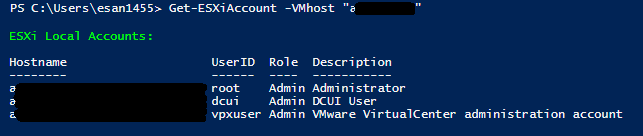
翻了下脚本代码, 这个方法在脚本里面, 可怎么直接调用起来的? powershell 菜鸡一枚, 来请教下大佬
]]>在对 PowerShell 7.0 RC1 的所有已合并 PR 分类后,我们已经决定拟在下周发布个 RC2。GA 有望在二月早期发布。
你鸽你有理

站在产品的角度来说,也算是个好事吧。
]]>win 连接 linux,有 3 种情况。
1 win 的 cmd to linux 的 bash
2 win 的 powershellv6,v7 to linux 的 bash
3 win 的 powershellv6,v7 to linux 的 powershell。
------讲解上述情况 2-----
在 powershell 中运行:ssh root@ip
在 win term 中编写
"commandline" : "C:\\Program Files\\PowerShell\\7-preview\\pwsh.exe -noexit -command 'ssh root@ip' ",
------讲解上述情况 3-----
3.1 脚本下载地址:
powershell 入门资料下载:含绝大多数电子书,入门基础资料。
https://pan.baidu.com/s/1p2zK-BewhursJxDNQnq5PQ
3.2 需求:
需要 linux 中安装 powershell,并改写 sshd 配置文件。
需要先配好 sshkey。
3.3 脚本用途:
3.3.1 在 powershell v6,v7 中,直接运行 ssh_to_centos7.ps1 ,可以进入 linux powershell 命令行。
3.3.2 建议改写 win term 标签配置文件。
{
"acrylicOpacity" : 0.5,
"closeOnExit" : true,
"colorScheme" : "Campbell",
"tabTitle" : "ps62",
"commandline" : "C:\\Program Files\\PowerShell\\7-preview\\pwsh.exe -noexit -file d:\\ps\\ssh_to_centos7.ps1",
"scrollbarState": "visible",
"cursorColor" : "#FFFFFF",
"cursorShape" : "bar",
"fontFace" : "Monaco_YH_Nero_Mono",
"fontSize" : 18,
"guid" : "{c3d2cb60-5f6d-4e83-89ee-eec17960fc9a}",
"historySize" : 9001,
"icon" : "ms-appx:///ProfileIcons/{574e775e-4f2a-5b96-ac1e-a2962a402336}.png",
"name" : "PowerShell Core 7",
"padding" : "0, 0, 0, 0",
"snapOnInput" : true,
"startingDirectory" : "c:\\ProgramData\\kasini3000",
"backgroundImage": "d:\\ps 壁纸.jpg",
"backgroundImageAlignment": "center",
"backgroundImageAlignment": "uniformToFill",
"backgroundImageOpacity" : 0.2
},
编写并保存后,点击 win term 标签,即可打开远程终端,基本可以代替终端软件。 ]]>
PowerShell 7.0 对广大 Windows 平台的 PowerShell 用户来说,最惊艳的莫过于 Out-GridView 命令的回归,同时 Joey 也列了一些功能卖点:
]]>
- .NET Core 3.1 (LTS)
ForEach-Object -Parallel- Windows compatibility wrapper
- New version notification
- New error view and
Get-Errorcmdlet- Pipeline chain operators (
&&and||)- Ternary operator (
a ? b : c)- Null assignment and coalescing operators (
??and??=)- Cross-platform
Invoke-DscResource(experimental)Out-GridView,-ShowWindowand other legacy GUI cmdlets are back on Windows- A ton of awesome quality-of-life improvements too numerous to list out here
先说自己的版本,版本非常低的 win10 专业版,因为比较厌恶升级,已经关了自动更新 2,3 年了。至今我的任务管理器仍然不能显示 GPU。。
回到正题,是一个什么问题呢?就是 powershell 会卡住,然后 ctrl+c 一下就不卡了。。
2 个例子
1. 用 youtube-dl (一个命令行工具)下视频时,有时候会卡住,shell 里显示的速度和已下载一直卡住不动,这时候 ctrl+c 一下,就马上不卡了
2.自己写的一个 http 代理模块,在访问到网页时会打 log。代理程序是用 powershell 在命令行起的。用这个代理访问网页有时候会一直转,加载不出来。然后会发现 log 在 powershell 没打出来。这时候 ctrl+c 一下,log 刷的一下就打出来了。网页也进去了。
有没有大神赐教,这是啥问题? ]]>
11 月 7 日是京东双 11“电脑数码狂欢日”,京东为在这一天购买电脑的网友给出了四个秒杀时间节点,分别是 0 点,10 点,16 点和 20 点,部分笔记本电脑和 NAS 设备甚至有千元以上的降价幅度。
我的所有 powershell 脚本,下载地址:
https://pan.baidu.com/s/16deKKe3ZnCg809lffiVZWg
欢迎收藏,给我铜币。 ]]>
移动的文件夹,与目标文件夹有相同文件名的文件,如何强行覆盖?
]]>现在问题是,如何删除一个已经导入进去的 IIS 证书,比如 IIS 证书名是:Name, 有无方法,用命令行或 PowerShell 来删除它。
网上找到的方法是采用 CertUtil [选项] -delstore CertificateStoreName CertId 来删除,但无法读到 CertificateStoreName 与 CertId,也就没有办法了,请求协助。
]]>如何用 powershell 将他导到另一台服务器上呢? 因为操作系统是 windows core 模式,没有视窗界面,然后卡在这上面了,呜呜,求大佬帮忙。
]]>上面命令,仅能对文件夹中的文件起作用,文件夹本身不起作用,请问有什么语法,支持直接操作文件夹权限的吗?
希望哪位大哥相助:)
]]>这个项目看上去气势磅礴,值得关注。
]]>Out-GridView 通过GraphicalTools 模块在全部支持 PowerShell Core 的平台上登场了。安装
如果要使用,运行以下 cmdlet 安装:
Install-Module Microsoft.PowerShell.GraphicalTools 更多信息请访问微软开发者博客:Out-GridView Returns
]]>2 欢迎挑毛病,让我更完善帖子。
3 大都是 ps6 的新特性。ps7 刚刚开始开发,新特性也只有一点点。
----------------------------------------------------------------
┏┳━━━━━━━━━━━┓
┃┃███████████┃
┃┃███████████┃
┣┫███████┏━┓█┃
┃┃███████┃P┃█┃
┃┃███████┃O┃█┃
┃┃███秘███┃W┃█┃
┣┫███████┃E┃█┃
┃┃███████┃R┃█┃
┃┃███████┃S┃█┃
┃┃███████┃H┃█┃
┣┫███████┃E┃█┃
┃┃███籍███┃L┃█┃
┃┃███████┃L┃█┃
┃┃███████┗━┛█┃
┣┫███████████┃
┃┃███V6.0██████┃
┃┃███████████┃
┗┻━━━━━━━━━━━┛
在 powershell 6.0 中新增内置变量
$IsCoreCLR
$IsLinux
$IsMacOS
$IsWindows
用于判断系统。
#假想中的复制文件脚本,由于 win,linux 目录路径,不兼容。
#所以你要在一个脚本中,分别写 2 段代码。
if ($IsWindows)
{
copy-item c:\xxx d:\yyy
}
if ($IsLinux)
{
copy-item /home/user1 /home/user2
}
我原创 分享! 2016-12-02
if ($PSEdition -eq 'Desktop')
{
#win
}
if ($PSEdition -eq 'Core')
{
#linux
}
----------------------------------------------------------------
┏┳━━━━━━━━━━━┓
┃┃███████████┃
┃┃███████████┃
┣┫███████┏━┓█┃
┃┃███████┃P┃█┃
┃┃███████┃O┃█┃
┃┃███秘███┃W┃█┃
┣┫███████┃E┃█┃
┃┃███████┃R┃█┃
┃┃███████┃S┃█┃
┃┃███████┃H┃█┃
┣┫███████┃E┃█┃
┃┃███籍███┃L┃█┃
┃┃███████┃L┃█┃
┃┃███████┗━┛█┃
┣┫███████████┃
┃┃███V6.0██████┃
┃┃███████████┃
┗┻━━━━━━━━━━━┛
powershell6.0 即 linux 版中,New-PSSession 新增 3 个参数, [-HostName ] , [-UserName ] , [-KeyFilePath ] ,
-SSHTransport 布尔型 强制使用 ssh 协议,而不是 winrm 协议
用于 linux 客户机,连接 linux 服务器。
命令:
$连接 2 = New-PSSession -HostName 127.0.0.1 -UserName user006 #手动输入密码或用-KeyFilePath 选项
Invoke-Command -Session $连接 2 -ScriptBlock {new-item ~/ccc.txt}
用了-HostName 参数后,端口默认 22。
用了-computername 参数后,端口默认 5985。
----------------------------------------------------------------
┏┳━━━━━━━━━━━┓
┃┃███████████┃
┃┃███████████┃
┣┫███████┏━┓█┃
┃┃███████┃P┃█┃
┃┃███████┃O┃█┃
┃┃███秘███┃W┃█┃
┣┫███████┃E┃█┃
┃┃███████┃R┃█┃
┃┃███████┃S┃█┃
┃┃███████┃H┃█┃
┣┫███████┃E┃█┃
┃┃███籍███┃L┃█┃
┃┃███████┃L┃█┃
┃┃███████┗━┛█┃
┣┫███████████┃
┃┃███V6.0██████┃
┃┃███████████┃
┗┻━━━━━━━━━━━┛
Get-Content $Path -Encoding Byte (或许临时)变更为
Get-Content $Path -AsByteStream ]]>
它基于使用秘钥的 ssh。
而我编写的这个脚本,专门帮助你实现,从 win 发布公钥到 linux。 ]]>
需要先安装 PSSQLite 模块,具体可以参考用 PowerShell 玩转 SQLite 数据库
Import-Module PSSQLite $ent_codes_db = "D:\Scripts\DB\ent_codes.sqlite" $query = "INSERT INTO ent_codes VALUES (@name, @code, @regday, @character, @legalr, @capital, @bscope, @prov, @city, @addr)" Get-ChildItem D:\Downloads\json\ -Recurse -File | % { (Get-Content $_.fullname | ConvertFrom-Json).erDataList | % { $name = $_.name $code = $_.code $regday = $_.registrationDay $character = $_.character $legalr = $_.legalRepresentative $capital = $_.capital $bscope = $_.businessScope $prov = $_.province $city = $_.city $addr = $_.address Invoke-SqliteQuery -DataSource $ent_codes_db -Query $query -SqlParameters @{ name = $name code = $code regday = $regday character = $character legalr = $legalr capital = $capital bscope = $bscope prov = $prov city = $city addr = $addr } } }