所以想着不如收集一下 Made with Emacs 的博客吧,具体见:
]]>(setq lsp-java-9-args '( "-XX:+UseParallelGC" "-XX:GCTimeRatio=4" "-XX:AdaptiveSizePolicyWeight=90" "-Dsun.zip.disableMemoryMapping=true" "-Denv=test "-Xmx8G" "-Xms1G" "-javaagent:~/.m2/m2repo/org/projectlombok/lombok/1.18.12/lombok-1.18.12.jar")) M-x dap-debug-edit-template 添加模板
(dap-register-debug-template "Java Run Configuration" (list :name "Debug (Launch) - Current File" :type "java" :request "launch" :args "hello" :vmArgs "-Denv=test" :jvmArgs "-Denv=test" :cwd nil :stopOnEntry :json-false :host "localhost" :request "launch" :modulePaths [] :classPaths nil :projectName "MyApp" :MainClass Hello)) Hello.java
System.getProperty("env") M-x dap-debug ,不能获取值到 dev 的值 我想象问问是少了什么步骤吗,还是用的方法有错误?刚接触新手求教
]]>(use-package htmlize) (use-package org :hook ('before-save . 'lsz/org-mode-hook-func-before-save) :config (setq org-startup-truncated nil) (setq org-support-shift-select t) (setq org-use-sub-superscripts '{}) (setq org-use-fast-todo-selection t) (setq org-todo-keywords '((sequence "TODO(t)" "DOING(i)" "|" "DONE(d)" "ABORT(a)"))) ) (use-package ox-html :ensure org :config (setq org-html-htmlize-output-type 'inline-css) (setq org-src-fontify-natively t) ) (defun lsz/org-export-publish() "Publish org site by publish script." (interactive) (load "~/.emacs.d/lisp/script-org-export-publish.el")) (use-package ox-publish :ensure org :config ;; (setq org-html-postamble t) ;; (setq org-html-postamble-format '(("en" ""))) (setq org-export-with-sub-superscripts '{}) (setq org-publish-project-alist (let* ((lsz/site-path "~/Documents/LSZOrgArticle/") (lsz/site-pub-path "~/Documents/LSZOrgArticlePublish/") (get-content (lambda (x) (with-temp-buffer (insert-file-contents (concat lsz/site-path x)) (buffer-string)))) (lsz/site-postamble (funcall get-content "template/postamble.html")) (lsz/site-preamble (funcall get-content "template/preamble.html")) (lsz/site-head (funcall get-content "template/head.html"))) `( ("blog" :base-directory ,(concat lsz/site-path "article/blog/") :base-extension "org" :publishing-directory ,(concat lsz/site-pub-path "article/blog/") :publishing-function org-html-publish-to-html :recursive t :headline-levels 4 :auto-sitemap t :sitemap-filename "sitemap-index.org" :sitemap-title "blog" :html-doctype "html5" :html-head ,lsz/site-head :html-preamble ,lsz/site-preamble :html-postamble ,lsz/site-postamble :htmlized-source t :with-toc t ) ("reading" :base-directory ,(concat lsz/site-path "article/reading/") :base-extension "org" :publishing-directory ,(concat lsz/site-pub-path "article/reading/") :publishing-function org-html-publish-to-html :recursive t :headline-levels 4 :auto-sitemap t :sitemap-filename "sitemap-index.org" :sitemap-title "reading" :html-doctype "html5" :html-head ,lsz/site-head :html-preamble ,lsz/site-preamble :html-postamble ,lsz/site-postamble :htmlized-source t :with-toc t ) ("wiki" :base-directory ,(concat lsz/site-path "article/wiki/") :base-extension "org" :publishing-directory ,(concat lsz/site-pub-path "article/wiki/") ;; :publishing-function org-html-publish-to-html :recursive t :headline-levels 4 :auto-sitemap t :sitemap-filename "sitemap-index.org" :sitemap-title "wiki" ;; :html-doctype "html5" :html-head ,lsz/site-head :html-preamble ,lsz/site-preamble :html-postamble ,lsz/site-postamble ;; :htmlized-source t :with-toc t ) ("site" :base-directory ,(concat lsz/site-path "article/site/") :base-extension "org" :publishing-directory ,(concat lsz/site-pub-path "article/site/") :publishing-function org-html-publish-to-html :recursive t :headline-levels 4 :html-doctype "html5" :html-head ,lsz/site-head :html-preamble ,lsz/site-preamble :html-postamble ,lsz/site-postamble :htmlized-source t :with-toc nil ) ("static" :base-directory ,(concat lsz/site-path "article_static/") :base-extension "css\\|js\\|png\\|jpg\\|gif\\|zip\\|7z\\|rar\\|pdf" :publishing-directory ,(concat lsz/site-pub-path "/article_static") :publishing-function org-publish-attachment :recursive t ) ("all" :components ("blog" "reading" "wiki" "site" "static")) )))) 这是 ~/.emacs.d/lisp/script-org-export-publish.el
;;; need environment (package-initialize) (load "~/.emacs.d/init.el") ;;; publish file (org-publish-all) 这是正常渲染出来的,有代码高亮的 html
<pre class="src src-python"><span style="color: #a020f0;">import</span> csv <span style="color: #a020f0;">with</span> <span style="color: #483d8b;">open</span>(<span style="color: #8b2252;">'stock.csv'</span>,<span style="color: #8b2252;">'r'</span>) <span style="color: #a020f0;">as</span> fp: <span style="color: #a0522d;">reader</span> = csv.reader(fp) <span style="color: #a0522d;">titles</span> = <span style="color: #483d8b;">next</span>(reader) <span style="color: #a020f0;">for</span> x <span style="color: #a020f0;">in</span> reader: <span style="color: #a020f0;">print</span>(x) </pre> 这是 emacs --script 渲染出来的 html:
<pre class="src src-python"><span style="font-weight: bold;">import</span> csv <span style="font-weight: bold;">with</span> <span style="font-weight: bold;">open</span>(<span style="font-style: italic;">'stock.csv'</span>,<span style="font-style: italic;">'r'</span>) <span style="font-weight: bold;">as</span> fp: <span style="font-weight: bold; font-style: italic;">reader</span> = csv.reader(fp) <span style="font-weight: bold; font-style: italic;">titles</span> = <span style="font-weight: bold;">next</span>(reader) <span style="font-weight: bold;">for</span> x <span style="font-weight: bold;">in</span> reader: <span style="font-weight: bold;">print</span>(x) </pre> 效果图在 https://emacs-china.org/t/org-emacs-script-org-publish-all/20782
老哥们啊,这是咋回事,该从哪下手排查问题,我 google 了几个小时完全没有头绪。
]]>网络不好的可以访问下面链接:
]]>ps: 请大家不要引发编辑器的战争,我觉得只要用的顺手,可以完成工作,大家可以自己想用什么就用什么,没有绝对的好坏之分。 第一次尝试写东西,如果有哪里有错误欢迎指出,包括病句(不要嘲讽我,rua )
使用 Emacs 开发 Golang 一段时间时间了,今天将相关配置和踩过的坑总结分享出来,本文主要介绍的并不是从零开始的配置,主要都是与 Golang 开发功能相关的配置,默认认为你已经了解如何在 Emacs 查看一些内置的函数文档,绑定快捷键等基本操作,一些基础的 Emacs 功能可以参考梦梦的 Emacs builtin modes 功能介绍。
在使用任何 编辑器 /IDE 开发时,最核心的需求无非以下几点:
Emacs 自带的 electric-pair-mode 已经足够好用,只不过默认没有开启。
(setq electric-pair-inhibit-predicate 'electric-pair-conservative-inhibit) (add-hook 'prog-mode-hook #'electric-pair-mode) 在进行下一步配置之前,我们需要先安装 straight.el ,因为我们要用它来安装其他的第三方包。
(setq straight-check-for-modifications '(check-on-save find-when-checking)) (setq straight-vc-git-default-clone-depth 1) (setq straight-disable-native-compile (when (fboundp 'native-comp-available-p) (not (native-comp-available-p)))) (defvar bootstrap-version) (let ((bootstrap-file (expand-file-name "straight/repos/straight.el/bootstrap.el" user-emacs-directory)) (bootstrap-version 5)) (unless (file-exists-p bootstrap-file) (with-current-buffer (url-retrieve-synchronously "https://raw.githubusercontent.com/raxod502/straight.el/develop/install.el" 'silent 'inhibit-cookies) (goto-char (point-max)) (eval-print-last-sexp))) (load bootstrap-file nil 'nomessage)) straight.el 在安装其他包时需要访问 github,如果你的网络不够 绿色 咳咳…
可以将安装时的 github.com 替换为 github.com.cnpmjs.org 。
(defun +set-github-mirror (oldfunc &rest args) (let ((url (apply oldfunc args))) (replace-regexp-in-string (rx (group "github.com")) "github.com.cnpmjs.org" url nil nil 1))) (advice-add 'straight-vc-git--encode-url :around #'+set-github-mirror) 安装 go-mode.el ,其为我们在进行 Golang 开发时提供了相当多的常用功能。
(straight-use-package 'go-mode) 设置缩进。
(setq-default tab-width 4 indent-tabs-mode nil) 使用 goimports 代替 gofmt 在文件保存后自动格式化我们的代码
(setq gofmt-command "goimports") (add-hook 'before-save-hook #'gofmt-before-save) 如果你使用的是 MacOS 系统,那么需要使用 exec-path-from-shell 让 Emacs 读取系统的环境变量,不然 Emacs 可能找不到你安装的 go
(when (eq system-type 'darwin) (straight-use-package 'exec-path-from-shell) (setq exec-path-from-shell-arguments '("-l")) (add-hook 'after-init-hook #'exec-path-from-shell-initialize) (with-eval-after-load "go-mode" (with-eval-after-load "exec-path-from-shell" (exec-path-from-shell-copy-envs '("GOPATH" "GO111MODULE" "GOPROXY"))))) go-mode 在格式化代码时如果发现错误会弹出一个 buffer,这会打乱我们的窗口布局,其实我们只需要简单的设置下自带的 flymake-mode 就可以方便的在错误之间跳转而不是通过一个单独的 buffer 查看。
(add-hook 'prog-mode-hook #'flymake-mode) (with-eval-after-load "flymake" (define-key flymake-mode-map (kbd "C-c C-b") 'flymake-show-diagnostics-buffer) (define-key flymake-mode-map (kbd "M-n") 'flymake-goto-next-error) (define-key flymake-mode-map (kbd "M-p") 'flymake-goto-prev-error)) 这样就可以使用 M-n , M-p 在错误之间移动,然后把 go-mode 自动弹出的这个 buffer 关掉。
(setq gofmt-show-errors nil) 安装 company-mode ,在补全时可以使用 C-p C-n 或者 TAB 进行选择,回车完成补全。
(straight-use-package 'company) (add-hook 'prog-mode-hook #'company-mode) (setq company-tooltip-limit 10 company-tooltip-align-annotations t company-tooltip-width-grow-only t company-abort-manual-when-too-short t company-require-match nil company-backends '(company-capf) company-tooltip-margin 0) (with-eval-after-load "company" (define-key company-active-map [tab] 'company-complete-common-or-cycle) (define-key company-active-map (kbd "TAB") 'company-complete-common-or-cycle) (define-key company-active-map (kbd "C-p") #'company-select-previous) (define-key company-active-map (kbd "C-n") #'company-select-next)) 安装 eglot ,一个 Emacs 中轻量级的 LSP 客户端,在 go-mode 中启用。
(straight-use-package 'eglot) (add-hook 'go-mode-hook #'eglot-ensure) (setq eglot-ignored-server-capabilites '(:documentHighlightProvider) read-process-output-max (* 1024 1024)) eglot 使用 Emacs 内置的 project.el 管理项目,以 .git 目录作为项目的根目录,如果你的项目包含一些子项目,例如:
├── .git ├── project1 │ ├── go.mod │ └── main.go ├── project2 │ ├── go.mod │ └── main.go └── project3 ├── go.mod └── main.go 如果你不想让 project1 中的代码出现在 project2 的补全中,或者在 project2 中查找定义时不想要 project1 中的定义出现在你的选择列表中时,则推荐使用 go.mod 所在的目录为项目的根目录,解决不同项目间的代码补全与跳转影响。
(with-eval-after-load "go-mode" (with-eval-after-load "project" (defun project-find-go-module (dir) (when-let ((root (locate-dominating-file dir "go.mod"))) (cons 'go-module root))) (cl-defmethod project-root ((project (head go-module))) (cdr project)) (add-hook 'project-find-functions #'project-find-go-module))) eglot 默认会使用 eldoc 显示函数等文档,但是很多时候我们不是想立即查看,为了防止文档扰乱视线,给 eldoc 设置个 delay 时间。
(setq eldoc-idle-dealy 2) 如果你想在补全函数时带有占位符,可以对项目进行单独的配置,只需要在项目根目录的 .dir-locals.el 中添加如下代码,eglot 就会在初始化 gopls 之后修改 gopls 的配置,当然这个功能依赖 yasnippet ,所以我们也需要安装它。
(straight-use-package 'yasnippet) (add-hook 'prog-mode-hook #'yas-minor-mode) 在项目根目录中创建 .dir-locals.el 。
((go-mode . ((eglot-workspace-configuration . ((:gopls . (:usePlaceholders t))))))) 当然也可以在你的配置文件中默认开启,这样就不需要对项目单独设置。
(setq-default eglot-workspace-configuration '((gopls (usePlaceholders . t)))) 另一个非常有用的 tip 是如果你的项目使用了 Build Constraints ,也可以针对项目单独修改 gopls 的配置使代码的补全与跳转完美的工作。
((go-mode . ((eglot-workspace-configuration . ((:gopls . (:buildFlags ["-tags=debug"]))))))) 这里就不写出全局开启的示例了,而且这个功能一般不需要全局开启。
Emacs 内置的 electric-pair-mode 帮我们实现了括号匹配,project.el 可以在项目中查找文件、字符串等( project-find-file project-search project-switch-to-buffer )。
在安装了 eglot 、company-mode 后实现了代码的补全、跳转等功能( xref-find-definitions xref-find-references ),同时 eglot 配合内置的 flymake 也为我们提供了静态检查。
当然这些插件的功能远不只这些,例如 eglot 可以帮你重命名函数或变量(同时修改其引用处的名字),company-mode 不仅可以补全代码也可以补全文件路径、代码片段,在编写 Golang 时需要用到的一些工具链是不是也可以通过 elisp 管理从而达到一个命令进行安装 /更新等。
在 Emacs 中能限制你的只有你的想象力与行动力,种种强大或实用的功能不可能在一篇文章中全部介绍,剩下的就需要你自己发现或者根据自身特定需求进行扩展了。
]]>关注 EmacsTalk 收获更多 Emacs 使用技巧
在第五期节目里推荐过 Raycast 这个神器,之前知道它可以直接执行脚本,但一直没尝试过,最近发现它提供了一个 script-commands 仓库,里面整理了一些常用的脚本,比如清空废纸篓、刷新 DNS 等,比较实用。
但这个仓库的脚本非常多,我需要的只是其中很小一部分,所以需要一种方式来便捷地在两个目录间拷贝文件(称为 src 与 dst )。
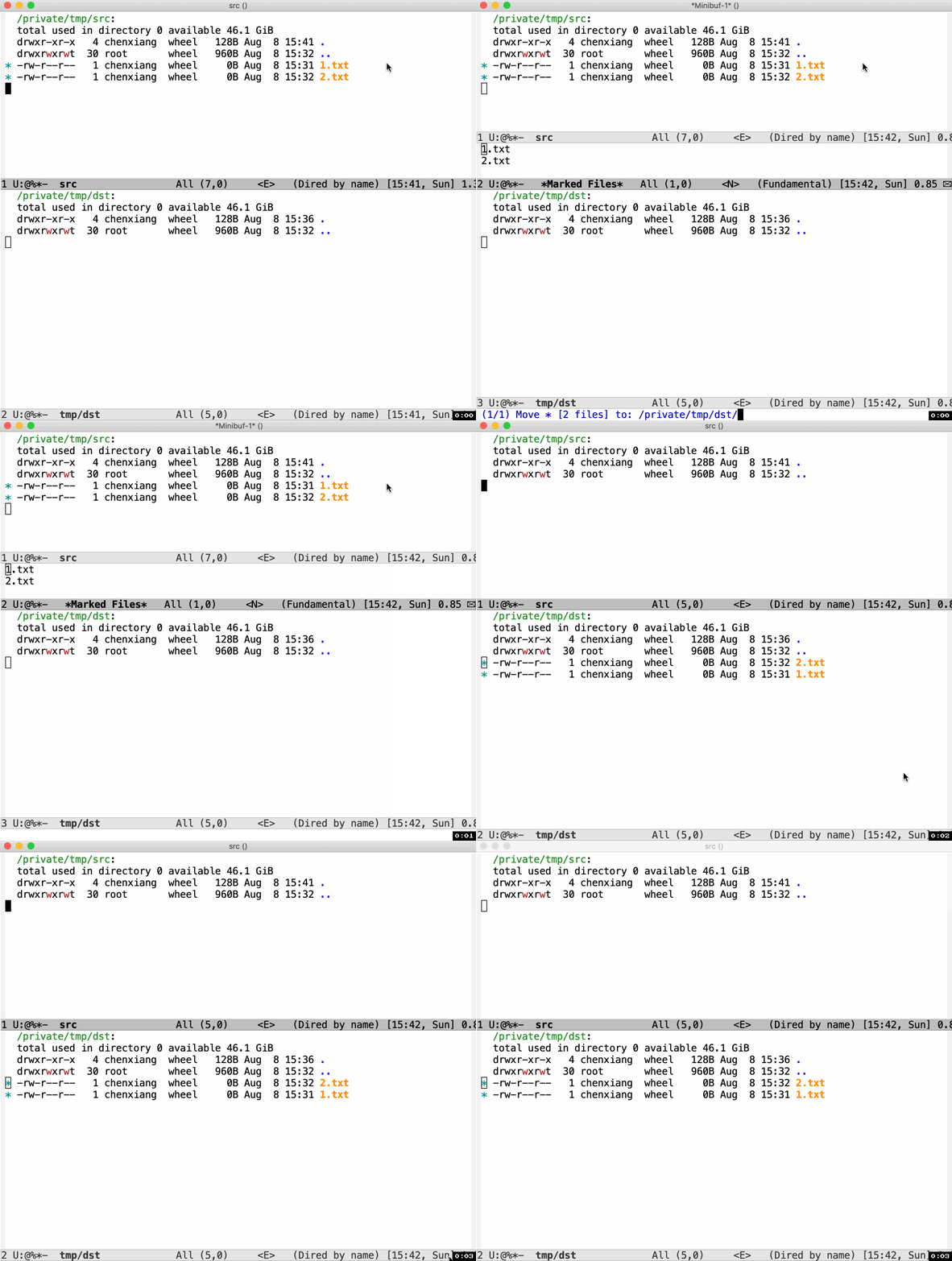
之前的话我都是在 Dired 里 mark 相关文件,然后再在 minibuffer 里找到 dst,如果 src 和 dst 离得比较远,整个过程会非常枯燥、低效,今天尝试 Google 了一下这个问题,发现一个好方式,流程如下:
设置 (setq dired-dwim-target t) 即可使用上述功能。Emacs is amazing !

(require 'package) (setq package-archives '(("gnu" . "https://elpa.gnu.org/packages/") ("melpa" . "https://melpa.org/packages/") ("org" . "http://orgmode.org/elpa/"))) (defun require-package (package &optional min-version no-refresh) "Install given PACKAGE, optionally requiring MIN-VERSION. If NO-REFRESH is non-nil, the available package lists will not be re-downloaded in order to locate PACKAGE." (or (package-installed-p package min-version) (let* ((known (cdr (assoc package package-archive-contents))) (versions (mapcar #'package-desc-version known))) (if (cl-find-if (lambda (v) (version-list-<= min-version v)) versions) (package-install package) (if no-refresh (error "No version of %s >= %S is available" package min-version) (package-refresh-contents) (require-package package min-version t)))))) (defun maybe-require-package (package &optional min-version no-refresh) "Try to install PACKAGE, and return non-nil if successful. In the event of failure, return nil and print a warning message. Optionally require MIN-VERSION. If NO-REFRESH is non-nil, the available package lists will not be re-downloaded in order to locate PACKAGE." (condition-case err (require-package package min-version no-refresh) (error (message "Couldn't install optional package `%s': %S" package err) nil))) (setq package-enable-at-startup nil) (package-initialize) (require-package 'magit) ;;;auto install magit ]]>我在 Emacs 下新建的文件,Tab 就是 4 个字符的。
在 Sublime 下打开的文件,再到 Emacs 中打开,Tab 显示出来就是 8 个字符了
]]>http://dsdshcym.github.io/blog/2018/01/22/compare-doom-emacs-spacemacs-vanilla-emacs/
]]>现在有一个接口是可以用的,我接上了无线鼠标的接收器;另一个接口接 U 盘的时候就会有上面的提示……
是不是说,我这块 HHKB 键盘的那个 USB 接口坏了,请问大家知道怎么修一下嘛?还可以抢救一下不?
]]>https://github.com/seagle0128/.emacs.d
个人不习惯 Spacemacs 的配置,喜欢纯粹的 Emacs 快捷键,追求简洁急速的编辑体验。Centaur Emacs 是一个轻量化的配置方案,能满足我日常的绝大部分需求,美观却又不那么耗费 CPU 和内存资源,启动也非常快速( 2s 以内)。喜欢的可以试用下 :)


然而我实验的结果却很奇葩( SQL 窗口里的命令,发送到 SQLi 窗口以后,没有新起一行显示,提示符挤占了列名的空间)
而且,为什么我的提示符跟人家的不一样?难道因为我是 root ?
qubeon=# ?column? ---------- 1 (1 row) qubeon=# select 1; ?column? ---------- 1 (1 row) 另外一个更明显的查询结果(无论用 C-r,C-b 还是 C-c 都一个鸟样)
qubeon=# oid_user_id | user_mobile ----------------------------------+------------- c3b41eca4a0b46ba8d70de80a36eed27 | 134579003 b1e09b60d2d648a3a0f7d61a579a0a08 | 974579099 c622af97e5734c79a64fcf674a52f6c6 | 134579005 格式全毁了啊
]]>spacemacs 想装个 php layer 一直报错结果发现不是我的锅
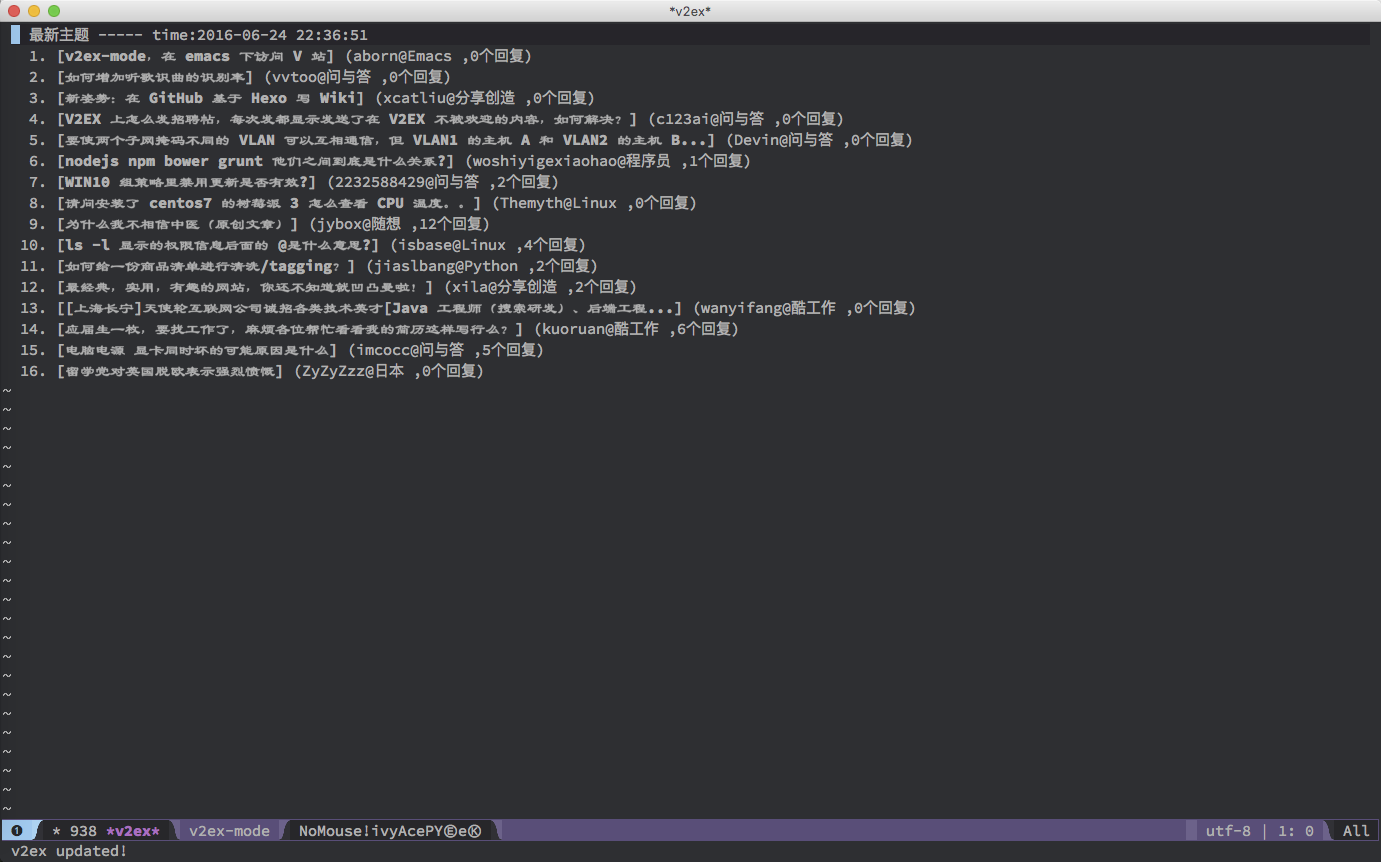
]]>
不过由于 V 站开放的 API 只有:最热主题和最新主题
所以只能查看这两个 topic 的内容。
参考: http://v2ex.com/p/7v9TEc53
~/.xprofile中添加ibus-daemon -d -x。之后就都正常了。 ]]>emacsclient -c发现字体设置没有生效,折腾一番之后发现如下方法: ;;; 设置中文字体 (defun my-apply-font () (set-default-font "Consolas") (set-fontset-font "fontset-default" 'chinese-gbk "微软雅黑") (setq face-font-rescale-alist '(("宋体" . 1.2) ("微软雅黑" . 1.1) ))) (my-apply-font) ;;; 使字体设置应用到 client 中 (add-hook 'after-make-frame-functions (lambda (frame) (select-frame frame) (my-apply-font))) XWidget Branch has been merged into Emacs 25.1 这意味着离在 Emacs 里嵌入 webkit 浏览器不远了! 看到这个消息比较激动, 开始还怀疑是不是我理解错了, 现在的 Emacs 维护者 John Wiegley 在邮件列表有对 push 的人评论: Yes, thank you! A momentous moment! reddit 的网友评论表示以后就在 Emacs 家住了, 不走了! Emacs 内能嵌入非纯文本的浏览器并结合 Emacs lisp 的编程操控能力, 能让 Emacs 的使用提升很大的一个台阶
相关邮件列表讨论参见 http://thread.gmane.org/gmane.emacs.devel/196096/
不了解 XWidgets 意味着什么的可以看看这里 https://www.emacswiki.org/emacs/EmacsXWidgets
更多详情参见 http://mp.weixin.qq.com/s?__biz=MzAwOTIxMjg0NQ==&mid=406266766&idx=1&sn=cf6a381445deb3eb5b530f9df72ffd99&scene=0 或者这里 http://emacsist.com/10692
]]>; ~/.emacs (set-default-font "Consolas") (set-fontset-font "fontset-default" 'chinese-gbk "微软雅黑") (setq face-font-rescale-alist '(("宋体" . 1.2) ("微软雅黑" . 1.1) )) 
(global-set-key (kbd "C-x g") ’ magit-status),结果却遇到了上面提到的问题,这到底是这么回事呢?(with-eval-after-load 'company (add-to-list 'company-backends 'company-tern)) 我比较感觉奇怪的是,不是 el-get 帮我加载了插件了吗?为什么还会遇到这样的问题.
el-get 的配置如下
(add-to-list 'load-path "~/.emacs.d/el-get/el-get") (unless (require 'el-get nil 'noerror) (with-current-buffer (url-retrieve-synchronously "https://raw.githubusercontent.com/dimitri/el-get/master/el-get-install.el") (goto-char (point-max)) (eval-print-last-sexp))) (add-to-list 'el-get-recipe-path "~/.emacs.d/el-get-user/recipes") (el-get 'sync) Emacs 是一个功能相对较多而且很复杂的 texteditor ,所以想要熟练使用必须要对 emacs 的一些基本概念进行了解,了解这些概念最好的教程就是 emacs 自带的 “ Emacs Tutorial “。可以通过点击菜单栏的 Help->Emacs Tutorial(choose language)进行学习。
要想将 Emacs 打造成舒适的代码阅读环境除了需要 Emacs 本体之外,还需要几种插 件来帮助我们实现这个愿望。 Emacs 是一种扩展性很强的编辑器,并且定义了一种 elisp 语言来专门配置 Emacs 并开发新的功能。我们为将 emacs 打造成代码阅读器所 需要的插件主要有 CEDET , ECB 以及 CSCOPE ,下面分别介绍一下这几个插件的作用。
cedet 是一堆完全用 elisp 实现的 emacs 工具的集合。包含了很多的功能,这个插件 的主要目的是为 Emacs 提供基础功能的支持以使其变成变成类似 Eclipse 或 VS 系列 这样的高级开发环境。
ECB 是“ Emacs Code Browser ”的简称,从其名字就可以看出这个插件的作用是将 Emacs 变成一
个代码浏览器。使用了ECB 之后的效果可见下图。
Cscope 是一款开源免费的 C/C++浏览工具,自带一个基于文本的用户界面,通过 cscope 可以很方便地找到某个函数或变量的定义位置、被调用的位置等信息。 Cscope 对 C /C++支持较好,也可以自己定制来支持 Java 和 Perl 、 Python 等脚本语 言。所以 CSCOPE 是一个为代码浏览提供基础功能的程序,这个程序并不是为了 Emacs 而专门开发的,因此要想在 Emacs 上使用这个程序需要在 Emacs 中安装插件调 用 CSCOPE 提供的功能。
接下来介绍这些插件的安装过程,首先 CEDET 的支持是直接包含在 emacs 中的并不 需要额外安装,因此我们只要安装 ECB 和 CSCOPE 就可以了。在介绍具体的安装过程 之前先介绍下 emacs 的插件配置过程。
简单地说 Emacs 的插件配置主要有以下两步,第一步是将插件文件拷贝到 emacs 的 插件文件夹(默认是~文件夹下的.emacs.d/)中,第二部是在 emacs 的配置文件 (~下的.emacs )中描述这个插件的路径 loadpath)并启用插件。
https://github.com/alexott/ecb 下载 ecb 的 tar 文件,解压后将解压出来的文件 拷贝到.emacs.d 中并编辑 emacs 配置文件加入以下代码。注意将文件的位置改成自 己的位置。
;;将 ECB 的路径添加到读取列表中 (addtolist 'loadpath "/home/augustus/.emacs.d/ecbmaster") ;;告诉 emacs 启用 ecb (require 'ecb) 保存 emacs 配置文件并重新启动 emacs 就可以在菜单栏的 Tools>Start Code Browser 打开 ecb了。
首先要在系统上安装 CSCOPE
sudo aptget install cscope 然后去 CSCOPE 的官网 http://cscope.sourceforge.net/ 下载源码包,并将其中的 xcscope.el 拷贝到
loadpath 包含的目录里。并在.emacs 里面加上
;;告诉 emacs 启用 cscope (require 'xcscope) 至此,用 emacs 来阅读 c/c++源代码所需要的工具包都安装好了,当然用 emacs 来写代码调试代码都是很方便的,也有很多相关的插件,但这已不在本文的范围之内了。
下面我们用 bitvisor 的源代码为例展示一下用这套工具阅读源码的强大之处。首先我们用配置好的 emacs 打开 vtmain.c 文件,然后在菜单栏里选择 Tools>Start Code Browser(ECB)来开启 ECB ,也可以使用 Mx 'ecbactivate 来开启 ecb 。并且可以看到菜单栏里出现了CSCOPE 的菜单,下面我就来一一介绍下 CSCOPE 提供的 这些功能都有什么作用。
首先 CSCOPE 对源码进行分析时需要对要分析的源码建立一个索引,否则就没办法 提供诸如代码跳转之类的功能。通过在菜单栏选择 Cscope>Cscope Database>Set Initial Dictionary 设置代码的初始目录,然后再选择 create list of files to index 并选择一个目录,这样 cscope 就会对该目录下的所有源 代码建立索引,也就意味着在你选择的这个目录范围之内的所有源代码都可以在你阅读和分析的时候进行变量函数等内容的跳转。
我们以 Find Symbol 这个指令为例介绍下 CSCOPE 的使用,其他的指令和这个指令的 功能是类似的。如文字意思所述,这个指令提供的功能是在源代码中搜索一个 Symbol ,这个 Symbol 可以理解为变量,函数名称,类名等有意义的符号。通过选 中想要查找的内容然后选择这个指令就可以在所有源码中搜索选中的这个符号了。 然后就会看到下图的内容
CSCOPE 给出了所有包含这个 Symbol 的文件 list , 只要点击鼠标中键就可以查看对应的那行代码了。当你看完代码想要回到跳转之前的那段代码只要选择 Cscope 菜单里的 pop mark 功能就好了。类似的功能有 Find globaldefinition no prompting, Find text String, Find egrep pattern, Find a file 等,都可以通过名字来判断功能,使用方法上和 Find Symbol 是一样 的。当然如果完全用鼠标选择这些功能的话效率是非常低下的,所以我们需要快 捷键来提高我们的工作效率, Emacs 本身为这些功能定义好了一组快捷键,但是使 用起来一点都不方便,以 Find Symbol 为例他的快捷键是'Cc s s',也就是说要按下 Control+C 再按 s s 才能完成这一功能,所以我们要改造 Cscope 的快捷键。
在 emacs 里自定义快捷键是一件十分方便和快捷的事情,只要打开.emacs 文件进行 设置就可以了,这里我给出一段.emacs 中设置快捷键的代码
;;将 findthisfile 功能绑定到 Ctrl+F4 上 (definekey globalmap [(control f4)] 'cscopefindthisfile) ;;将 findthissymbol 功能绑定到 Ctrl+F5 上 (definekey globalmap [(control f5)] 'cscopefindthissymbol) (definekey globalmap [(control f6)] 'cscopefindthistextstring) (definekey globalmap [(control f7)] 'cscopefindglobaldefinitionnoprompting) (definekey globalmap [(control f8)] 'cscopepopmark) (definekey globalmap [(control f9)] 'cscopeprevsymbol) (definekey globalmap [(control f10)] 'cscopenextsymbol) (definekey globalmap [(control f11)] 'cscopeprevfile) (definekey globalmap [(control f12)] 'cscopenextfile) 这样通过一番调试和适应之后就能很快的学会 Emacs 看源代码啦!
]]>non-prefix key , C-h b 就没找到空的位置,大家是怎么解决的? ]]>Warning (initialization): An error occurred while loading `/Users/Feiox/.emacs.d/init.el': Symbol's function definition is void: set-fontset-font To ensure normal operation, you should investigate and remove the cause of the error in your initialization file. Start Emacs with the `--debug-init' option to view a complete error backtrace. 在 EmacsForMac 的 App 中启动,报错:
Warning (initialization): An error occurred while loading `/Users/Feiox/.emacs.d/init.el': File error: http://melpa.org/packages/cider-20151013.1548.tar, Not found To ensure normal operation, you should investigate and remove the cause of the error in your initialization file. Start Emacs with the `--debug-init' option to view a complete error backtrace. 这是由于什么原因呢?
P.S. 原始配置文件未改动过
我自个儿试了下, iBus 或是 fcitx 在其他程序中运行都很正常,唯独 Emacs 不认。
最后只好改用 eim 。
]]>/* 后要好久才能上色。删了注释也好久才能重新上色。 不知道各位有没有这种问题?原因是什么?
我用的是 os x 的 terminal
]]>