

LAMP(Apache)网站通过 Let’s Encrypt SSL 证书升级 https
GavinHsueh 2020-10-16 15:18:46 +08:00 2071 次点击这是一个创建于 1872 天前的主题,其中的信息可能已经有所发展或是发生改变。
原文出处:LAMP 网站申请 Let’s Encrypt SSL 证书升级 https
基本概念:
HTTP: 是互联网上应用最为广泛的一种网络协议,是一个客户端和服务器端请求和应答的标准,用于从 WWW 服务器传输超文本到本地浏览器的传输协议,它可以使浏览器更加高效,使网络传输减少。
HTTPS:是以安全为目标的 HTTP 通道,简单讲是 HTTP 的安全版。即 HTTP 下加入 SSL 层,HTTPS 的安全基础是 SSL,因此加密的详细内容就需要 SSL 。
谷歌、火狐等浏览器厂商也已经扛起 HTTPS 大旗,对于 HTTP 站点会提示不安全警告。而且像谷歌、百度等搜索引擎也早已响应 HTTPS 号召,都声称对 HTTPS 站点页面友好甚至优先抓取,排名靠前,当然具体实际实施情况就另当别论了。要让互联网站点都升级到 HTTPS 协议还需一段时间,但不可否认 HTTPS 是大势所趋。
网站环境:
操作系统:centos6.5 x64 (阿里云 ECS 服务器)
web 服务:Apache 2.4+
免费证书商家:Let's Encrypt SSL
网站程序: 蝉知企业门户系统
操作流程:
1.安装证书
Let's Encrypt SSL 免费证书,有效期 3 个月,需要定期更新。( 更多国内外免费 SSL 证书推荐参考)
安装 SSL 证书可以使用 certbot 工具,操作十分简单方便。
下载 certbot,并设置权限:
wget https://dl.eff.org/certbot-auto chmod a+x certbot-auto 使用 certbot 申请安装证书:
./certbot-auto certonly --webroot --apache -w /data/wwwroot/www.chanzhicms.com -d www.chanzhicms.com --no-self-upgrade -w 后面是网站的根目录路径,-d 后面是申请证书的域名,多个域名的话,在后面继续添加设置多个-d 即可。 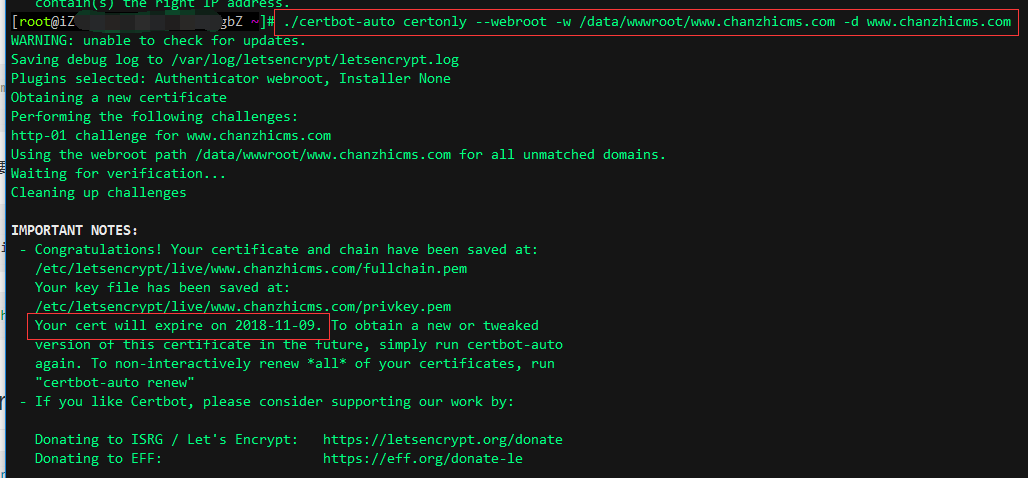 申请成功后,可以查看到 SSL 证书的有效截止日期。申请的证书默认存放在 /etc/letsencrypt 目录下。
2.修改 Apache 配置文件
设置 apache 的配置文件 /usr/local/apache/conf/httpd.conf,要修改两个地方,找到下面两行将其前面的#去掉即可。
LoadModule ssl_module modules/mod_ssl.so Include conf/extra/httpd-ssl.conf 然后修改 /usr/local/apache/conf/extra/httpd-ssl.conf 文件,将里面内容清空,放入下面内容: Listen 443 AddType application/x-x509-ca-cert .crt AddType application/x-pkcs7-crl .crl SSLCipherSuite EECDH+CHACHA20:EECDH+CHACHA20-draft:EECDH+AES128:RSA+AES128:EECDH+AES256:RSA+AES256:EECDH+3DES:RSA+3DES:!MD5 SSLProxyCipherSuite EECDH+CHACHA20:EECDH+CHACHA20-draft:EECDH+AES128:RSA+AES128:EECDH+AES256:RSA+AES256:EECDH+3DES:RSA+3DES:!MD5 SSLHonorCipherOrder on SSLProtocol all -SSLv2 -SSLv3 SSLProxyProtocol all -SSLv2 -SSLv3 SSLPassPhraseDialog builtin SSLSessionCache "shmcb:/usr/local/apache/logs/ssl_scache(512000)" SSLSessionCacheTimeout 300 Mutex sysvsem default SSLStrictSNIVHostCheck on 最后修改网站的单独配置文件,/usr/local/apache/conf/vhost/www.chanzhicm.com.conf,原本只有 80 端口配置,这里需要我们加上 443 端口的配置:
ServerAdmin [email protected] DocumentRoot "/data/wwwroot/www.chanzhicms.com" ServerName www.chanzhicms.com ServerAlias chanzhicms.com ErrorLog "/data/wwwlogs/www.chanzhicms.com_error_apache.log" CustomLog "/data/wwwlogs/www.chanzhicms.com_apache.log" combined SetOutputFilter DEFLATE Options FollowSymLinks ExecCGI Require all granted AllowOverride All Order allow,deny Allow from all DirectoryIndex index.html index.phpListen 443 DocumentRoot "/data/wwwroot/www.chanzhicms.com" ServerName www.chanzhicms.com:443 ServerAlias www.chanzhicms.com ErrorLog "/data/wwwlogs/www.chanzhicms.com_error_apache.log" ServerAdmin [email protected] SSLEngine on SSLCertificateFile /etc/letsencrypt/live/www.chanzhicms.com/fullchain.pem SSLCertificateKeyFile /etc/letsencrypt/live/www.chanzhicms.com/privkey.pem SetOutputFilter DEFLATE Options FollowSymLinks AllowOverride All Order allow,deny Allow from all DirectoryIndex index.html index.php Require all granted 上面配置中的网站名称、网站路径、证书路径等信息,大家根据自己的具体情况填写。
注意:
这里必须要特别强调一点,因为我的 Apache 版本是 2.4+的,在 Directory 中,一定要加上一条 Require all granted,否侧会出现网站 HTTP 访问正常,但 https 访问提示 403 forbidden 。这条命令是 apache2.4 新增加的,用以替代 allow,deny 以及 order 指令。
最后, 重启 Apache !重启 Apache !重启 Apache !
使用 https 访问网站,查看是否生效。
3.更新证书
证书快到期时,我在使用 certbot-auto renew 命令进行证书更新:
certbot-auto renew --no-self-upgrade 成功后,检查更新到期日期
./certbot-auto certificates 证书到期之前会有邮件提醒,这里介绍修改新订阅邮箱的方法:
./certbot-auto update_account --email [email protected] --no-self-upgrade 使用 crontab 自动续期证书 每隔两三个月更新一次证书,万一忘了怎么办?有木有版本让系统自动定期更新呢?当然可以,这里就需要用到 crontab 工具。
如果系统没有 crontab,则先安装:
yum install vixie-cron crontabs //安装 Crontab chkconfig crond on //设为开机自启动 service crond start //启动 /var/spool/cron 这里是所有的自动执行任务的 cron 文件存放位置( root 文件) 在 /var/spool/cron/root 文件里添加:
30 20 1 * * /root/certbot-auto renew --no-self-upgrade 即每月 1 号晚上 8 点半更新证书。
重启服务生效:
service crond restart 查看 crontab 定时执行任务列表
crontab -l 4.常见问题
1.升级 HTTPS 后,前台界面样式错乱。 蝉知系统用户升级 https 后,如果前台界面样式错乱,可以尝试在后台--站点--网络 中关闭 CDN 功能。
2.安装证书时提示错误,无法对网站进行验证。 这个问题折腾了半天,最后在 stackoverflow 上看到类似问题,有人提及跟 cdn 有关,因为我把域名都添加了百度 CDN 云加速,所以就把 CDN 去除试了下,没想到问题真的解决了。这里也记一下,或许对大家有帮助。
3.网站 http://访问正常,但 https://访问提示 403 forbidden 。 因为我的 Apache 版本是 2.4+的,在 Directory 中,一定要加上一条 Require all granted,否侧会出现网站 HTTP 访问正常,但 https 访问提示 403 forbidden 。这条命令是 apache2.4 新增加的,用以替代 allow,deny 以及 order 指令。
4.更新 SSL 证书时卡住在 Installing Python packages...不动。 证书只能免费试用 3 个月,后期更新 ssl 证书时出现了问题,卡在 Installing Python packages 不动,如下图: 我用的是阿里云的 ECS 服务器 centos6.5 x64 。解决这个问题只需要修改下 pip.conf 文件,将阿里云的镜像改为清华的镜即可。方法如下:
vim ~/.pip/pip.conf [global] index-url=https://pypi.tuna.tsinghua.edu.cn/simple/ [install] trusted-host=pypi.tuna.tsinghua.edu.cn 改保存后,再试试 ./certbot-auto renew --no-self-upgrade 就正常了。
5.更新证书时,提示错误 The manual plugin is not working 。 更新证书时,如果提示如下错误:
Attempting to renew cert (www.chanzhicms.com) from /etc/letsencrypt/renewal/www.chanzhicms.com.conf produced an unexpected error: The manual plugin is not working; there may be problems with your existing configuration. The error was: PluginError('An authentication script must be provided with --manual-auth-hook when using the manual plugin non-interactively.',). Skipping. All renewal attempts failed. The following certs could not be renewed: /etc/letsencrypt/live/www.chanzhicms.com/fullchain.pem (failure) 解决方法: 创建手动授权脚本,输入如下命令
vim /etc/letsencrypt/renewal/www.chanzhicms.com.sh #!/bin/bash echo $CERTBOT_VALIDATION > /path/to/wwwroot/.well-known/acme-challenge/$CERTBOT_TOKEN 其中,/path/to/wwwroot/ 为您域名验证的网站根目录
使脚本可执行:
chmod +x /etc/letsencrypt/renewal/www.chanzhicms.com.sh 带参数执行命令
certbot-auto renew --no-self-upgrade --manual-auth-hook /etc/letsencrypt/renewal/www.chanzhicms.com.sh 成功后,检查更新到期日期
./certbot-auto certificates --no-self-upgrade 小结:
网站升级 https 其实并不复杂,只是一些细节问题上可能会因环境而异,所以不要盲目地仿照他人操作流程,一定要先看服务器环境。其次,因为 https 使用 443 端口,所以服务器防火墙要放开 443 端口访问,我用的阿里云服务器,还会涉及到安全策略设置,所以在操作时,注意检查端口是否监听。
如果大家在部署 https 访问网站时遇到其他问题,欢迎留言反馈,我们共同学习交流。

 | 2 mzname 2020-10-20 22:27:55 +08:00 看了标题和 1L 有一瞬间以为自己在看机场建设教学 [捂脸] |
 Select Language