

mac 下面有很多好用 terminal 工具就不多说了。可是,这么多年了, windows 下面有没有好用的?
yazoox 2020-03-27 09:09:01 +08:00 6497 次点击这是一个创建于 2076 天前的主题,其中的信息可能已经有所发展或是发生改变。
有些产品是运行在 windows 下面的,避免不了在 windows 下面工作,调度等等。
可是,这么多年了,windows command line 那玩意儿怎么样,就不多说了。
有没有质量高,稳定可靠的,又好用的 windows 下面的的 terminal 工具呢?
谢谢!
p.s. 楼主自己在用的是一个 conemu 。日常简单命令用用总是不大。
但是如何要使用 git 或者其它一些比较复杂,或者和程序设计相关的事情时,偶尔有时候会“出错”,运行不正常。
只有切换回 windows command line,才能正常运行......
 | 1 dot2017 2020-03-27 09:10:25 +08:00 SecureCRT |
 | 2 yhxx 2020-03-27 09:11:06 +08:00 cmder 凑合一下? 我平时一般是把 vscode 的终端改成 git bash 在用 |
 | 3 wtks1 2020-03-27 09:15:34 +08:00 via Android securecrt 或者 xshell |
 | 4 codehz 2020-03-27 09:17:01 +08:00 via Android (现在来说的话,自带的终端支持的东西已经比较多了,什么 ANSI code,鼠标输入(如 ssh/wsl )当然 emoji 还不行 然后微软当然也知道这个,于是又发布了 Windows Terminal |
 | 5 Varobjs 2020-03-27 09:19:02 +08:00 via Android cmder 还不错 PowerShell 也可以啊 window terminal 预览版也能用用 或者 termius 免费版 也可以打开新世界 真不行 xshell finalshell 之类满足不了你吗 |
 | 6 amon 2020-03-27 09:21:39 +08:00 说起这个,又想起了 Mac 下哪怕自带终端也有那种丝滑了,更别说 iTerm 这种。 再看 Windows,用了快一年,主要是 Git bash 和 Xshell,用是够用了,爽不爽是另外一回事。 |
 | 7 RyuZheng 2020-03-27 09:26:24 +08:00 termius 和 terminus,我现在常用后者,然后 mobaXterm 也不错 |
 | 8 linsage186 2020-03-27 09:29:10 +08:00 SecureCRT |
 | 9 Chingim 2020-03-27 09:33:07 +08:00 via Android  1 1 楼主想要的是终端,不是 ssh client!!! windows 终端没一个能打的,git bash 勉强能用 |
 | 10 Tumblr 2020-03-27 09:35:42 +08:00 |
 | 11 yazoox OP @Chingim 确实啊。很多人推荐的都是 ssh client,连接远程 server 用的。 我需要的是在 windows 机器上,自己用的。类似于 mac 上的 terminal 或者 iterm2 这样的。 |
 | 13 rockeyshao 2020-03-27 09:45:01 +08:00 Windows Terminal 未来可期 |
 | 14 cccxu 2020-03-27 09:45:09 +08:00 via Android wsl+new windows terminal? 反正 wsl 也可以操作 windows |
 | 15 ileeoyo 2020-03-27 09:58:22 +08:00 新版的 windows terminal,配合 git-bash,自己调整下主题颜色,目前还算够用 |
 | 16 forgottencoast 2020-03-27 10:17:29 +08:00 Windows Terminal 不香吗,可能我不是重度使用,我觉得很好用。 |
 | 17 0x11901 2020-03-27 10:24:30 +08:00 感觉你要的并不是 terminal,而是 shell…… |
 | 18 yEhwG10ZJa83067x 2020-03-27 10:27:23 +08:00 window terminal 预览版 非常好用啊,楼主试试看。我现在 xshell 已经渐渐不用了 |
 | 19 jin7 2020-03-27 10:32:36 +08:00 powershell cmd git-bash 常用 少用 极少用 Windows Terminal 出来就好了...就是需要多标签功能 |
 | 20 seasona 2020-03-27 10:32:42 +08:00 window terminal 预览版,以前不行,现在的 0.9 已经很好用了 |
 | 21 yjxjn 2020-03-27 10:33:34 +08:00 macOS 下有 termius,你也可以试试 Windows 版的 termius 。也很好用 |
 | 22 joshua7v 2020-03-27 10:39:55 +08:00 确实在 windows 下能支持 256 色的终端挺少的 最后我用了 mintty |
 | 23 chen5 2020-03-27 10:45:00 +08:00 mobaxterm |
 | 24 0xroot 2020-03-27 10:49:59 +08:00 cmder |
 | 25 whusnoopy 2020-03-27 11:11:28 +08:00 尝试一下微软官方的 Windows Terminal? https://github.com/microsoft/terminal 从 0.3 左右开始用的,大概 0.6 的时候抛弃了 cmder,本地处理,连 WSL 和 ssh 基本都够用了 本来说 4 月发布 1.0 的,看疫情影响可能够呛 |
 | 26 jswh 2020-03-27 11:42:30 +08:00 window terminal 0.10 版本已经支持鼠标了,配合 wsl 1 + tmux + vim 体验上已经没有大问题。个人对 wsl 2 需求不大,wsl 1 占用低一些。 p.s 个性化配置也基本够用,包括壁纸、透明度、颜色等。就是要自己写 json 比较烦 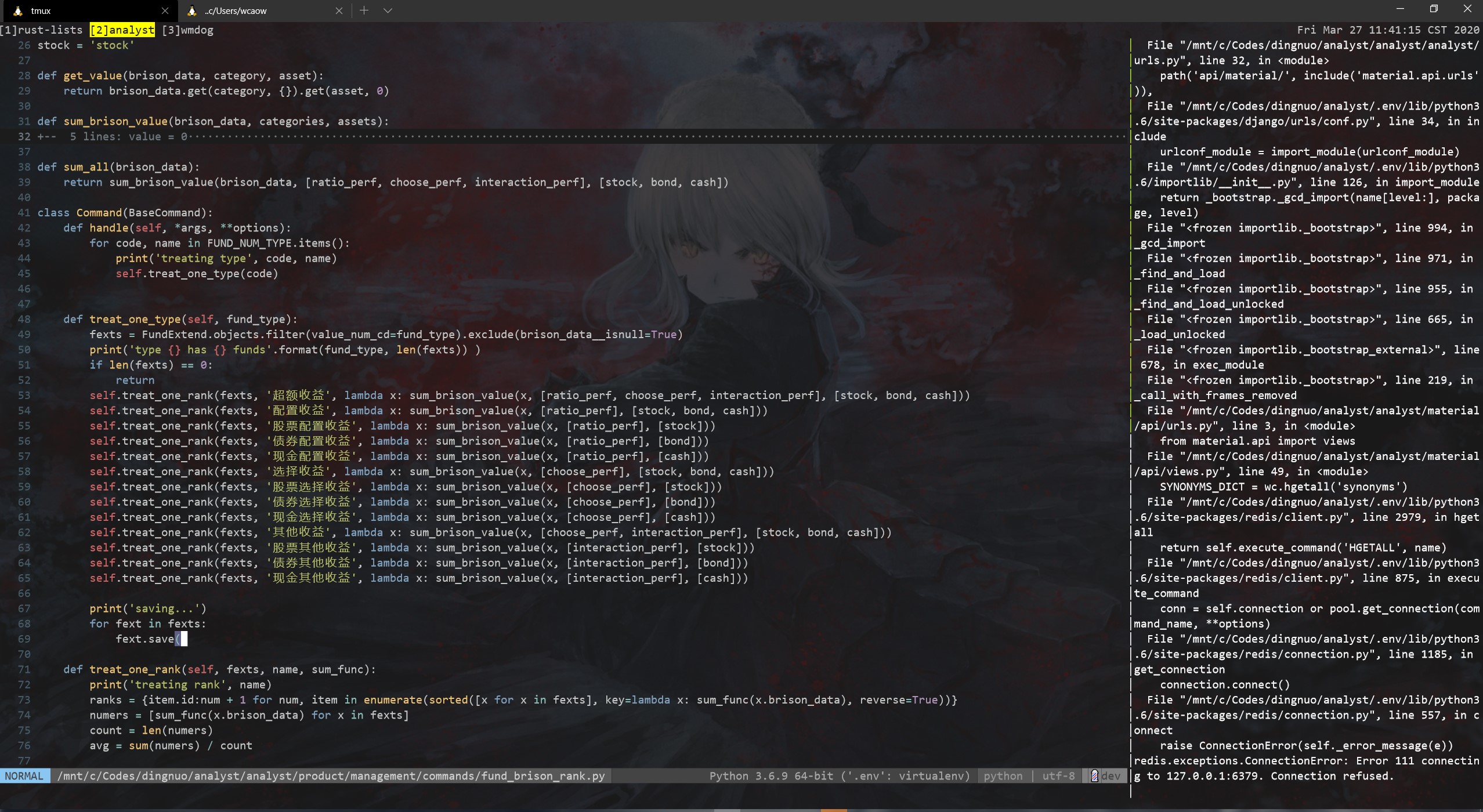 |
 | 27 learnshare 2020-03-27 11:47:37 +08:00 Windows Terminal 目前已经不错了,稍加配置即可用 |
 | 28 Drapor 2020-03-27 12:12:54 +08:00 via Android 在用 FluentTerminal,默认的样式比 Windows Terminal 好看一些 |
| 30 whusnoopy 2020-03-27 13:20:34 +08:00 @yazoox 直接去 Win10 的 Store 里搜索 Terminal 然后安装,为啥要去下他那个 msixbundle |
 | 31 linora 2020-03-27 13:27:41 +08:00 xmanager 产品族还不够用? macos 下没几个能打的 |
 | 32 kurotsuchi 2020-03-27 14:38:40 +08:00 git bash 还是挺好用的 |
 | 33 mazyi PRO hyper |
 | 34 Morge 2020-03-27 19:24:07 +08:00 via Android 如果对 Mac/linux 命令行比较熟悉,可以尝试一下 msys2 |
 | 35 upcliucong 2020-03-27 19:36:52 +08:00 Hyper |
 | 36 ysc3839 2020-03-27 19:38:55 +08:00 via Android @Tumblr 没记错的话 cmder 是把 ConEmu 和一些命令行工具打包做成一个开箱即用的环境。 |
 | 37 9yu 2020-03-27 20:30:23 +08:00 via Android msys2 |
 | 38 Helsing 2020-03-27 22:27:36 +08:00 via iPhone https://mp.weixin.qq.com/s/7g26fbljUO1H9ChnOcGRyQ cmder+wsl+oh my zsh |
 | 39 kaigong 2020-03-28 09:18:07 +08:00 via Android mobaXterm 好用 |
 | 40 AllenHua 2020-03-28 09:35:54 +08:00 via iPhone xshell free for home/school 还不行吗 |
 Select Language